
DocumentsApprovals
Approval workflows
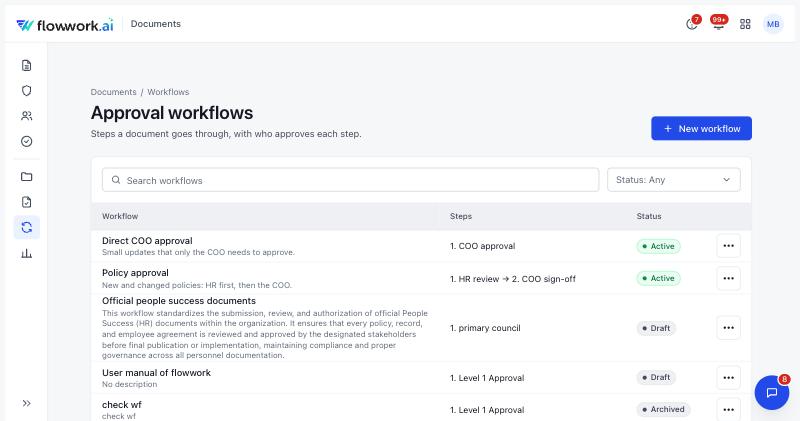
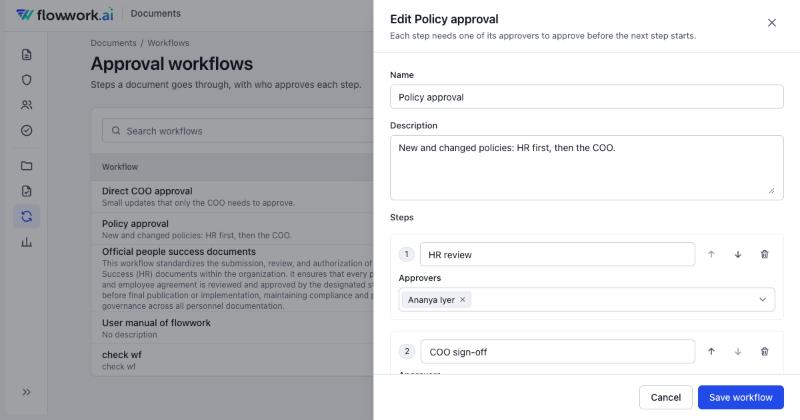
An approval workflow is the list of steps a document goes through before it's published, with the people who approve each step. For example "Policy approval": HR review, then COO sign-off.
Before you start
- You need View all document workflows or Manage document workflow to open Workflows. Creating needs Create document workflow; editing, activating and archiving need Edit document workflow. See Who can see what.
- Approvers are chosen from employees who can see document workflows. Give them View all document workflows first.
Create a workflow
- Go to Documents › Workflows and select New workflow.
- Enter a Name and, optionally, a Description.
- For step 1, enter the step's name and add one or more Approvers.
- Select Add a step for each further step. Use the arrows to change the order, or the bin to remove a step.
- Select Create workflow.
A new workflow starts as Draft.
Read the full guide with your flowwork account
The rest of this page has the steps, screenshots and tips. Anyone at a company that uses flowwork can read every page, and ask the Help assistant about it.
Every step, in order Real screenshots The agents that help
New companies use flowwork free until 31 December 2026