
DocumentsStart here
What Documents does, and the menu
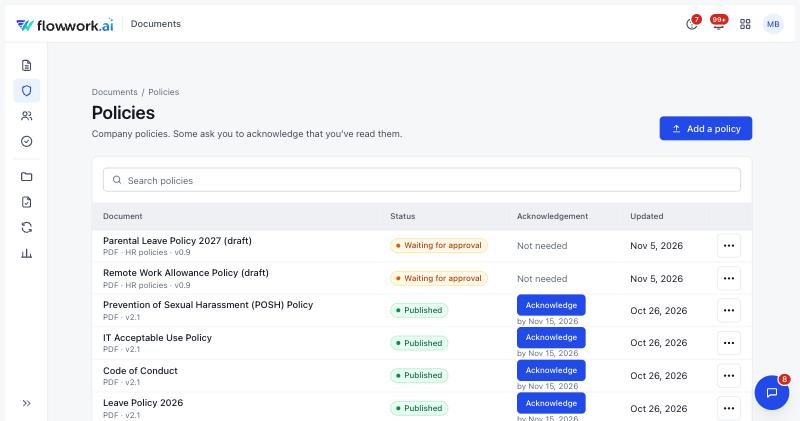
Documents is where your company keeps its policies and other shared files. Everyone reads the policies and signs the ones that ask for it. HR uploads documents, decides who can see each one, groups them in folders and, when needed, sends a document through an approval workflow before it's published.
Before you start
- Open Documents from the app launcher (the grid at the top right).
- What you see in the menu depends on your permissions. Two people in the same company can see different menus. See Who can see what.
- When you open Documents, you land on All documents if you can see it, otherwise on Policies.
The menu
The menu on the left has two groups.
Documents
| Item | What it's for | Who sees it |
|---|---|---|
| All documents | Every document you can see, with folder and status filters. Upload, edit and delete here. | People who can view all documents or manage documents |
| Policies | Company policies, with an Acknowledge button on the ones you must sign. | Everyone |
| Shared with me | Documents and folders shared with you, and who shared them. | Everyone |
| My acknowledgements | Documents you're asked to sign: to do, done and missed. | Everyone |
Manage
| Item | What it's for | Who sees it |
|---|---|---|
| Folders | Create folders, put folders inside folders, and share a folder. | People who can view all folders or manage folders |
| Approvals | Documents waiting for your decision. | People who can view all or manage document workflows |
| Workflows | Approval workflows: the steps and approvers a document goes through. | People who can view all or manage document workflows |
| Workflow status | Every document in approval and how far it has got. | People who can view all or manage document workflows |
Read the full guide with your flowwork account
The rest of this page has the steps, screenshots and tips. Anyone at a company that uses flowwork can read every page, and ask the Help assistant about it.
Every step, in order Real screenshots The agents that help
New companies use flowwork free until 31 December 2026