
RecruitAgents in Recruit
Agents in Recruit
Agents do routine Recruit work for you: drafting a job, ranking applicants, finding interview slots, proposing an offer. They work with your own login, so they see only what you can see. They never change anything until you confirm.
Before you start
- Agents are a paid add-on. AI agents must be switched on for your company. If you don't see Agents in the menu, ask your admin.
- To hire an agent, pause it or change its settings, you need the Manage agents permission. Everyone else can use the agents your company has hired, if the hire lets them.
Hire an agent
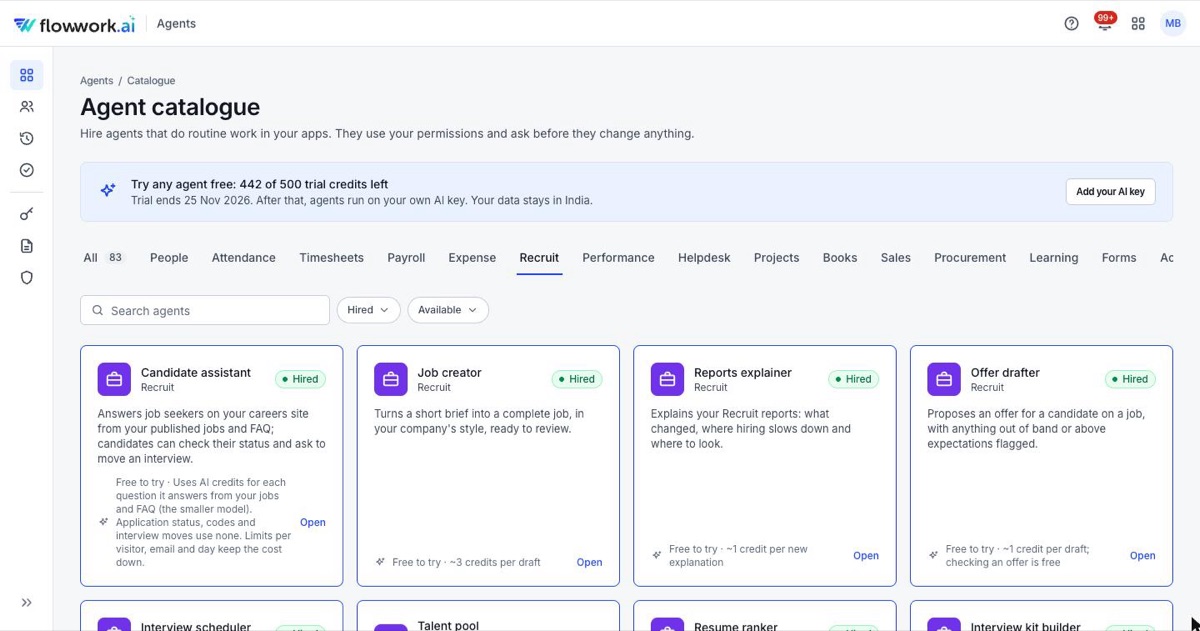
- Go to Agents › Catalogue and select the Recruit tab.
- Open the agent. Its Job description tab shows what it does, what it reads, what it can do, how it starts and what it costs.
- Select Hire agent.
- Under Who can use it, choose Everyone in [your company] or Only people with some roles, then pick the Roles.
- Under When it wants to change something, choose one:
- The person it works for confirms
- A manager approves
- Go ahead for read-only work. Changes still wait for a person.
- Set the Monthly credit limit (200 to start). The agent stops for the month when it reaches this.
- Select Hire agent.
You become the agent manager. You get its alerts and can pause it. To change these choices later, open the agent and select Settings. Pause stops it straight away; Resume starts it again. Agents › My agents lists every agent your company has hired.
Read the full guide with your flowwork account
The rest of this page has the steps, screenshots and tips. Anyone at a company that uses flowwork can read every page, and ask the Help assistant about it.
Every step, in order Real screenshots The agents that help
New companies use flowwork free until 31 December 2026