
RecruitOffers
Track offers: tiles, Needs my action, archive
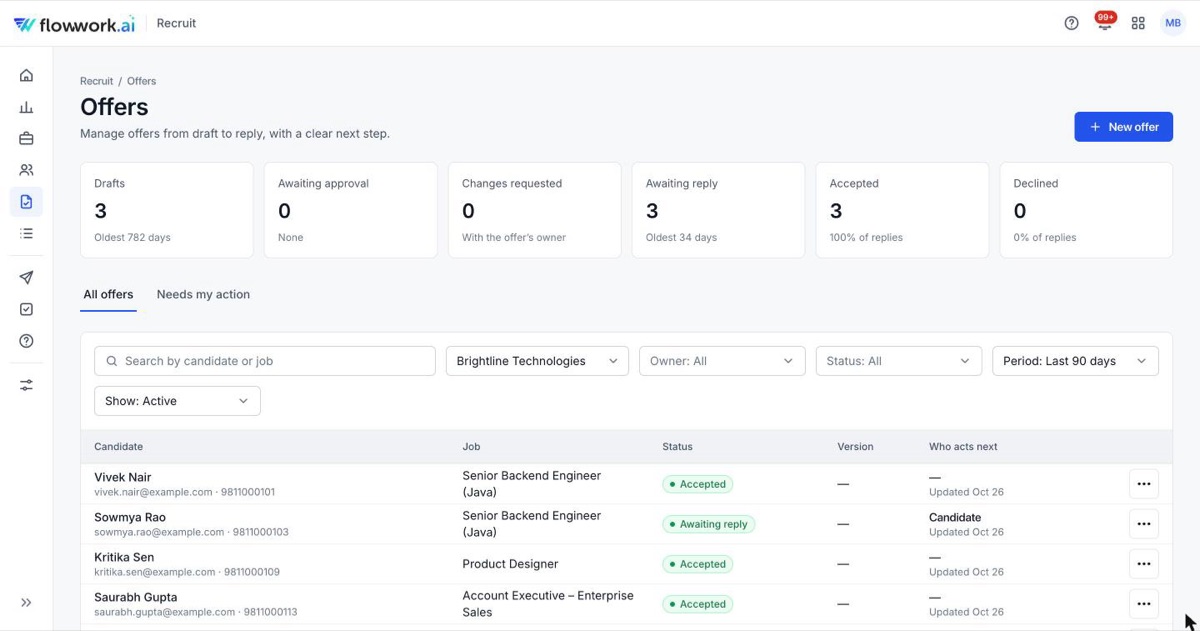
The Offers page lists every offer in an account, from draft to the candidate's reply. Tiles at the top count offers by status, and Needs my action lists what's waiting for you.
Before you start
- Offers must be turned on for your company, and you need permission to see offers. To open an offer you need permission to read offers.
- If your company has more than one account, you see one account at a time. Choose it under Account.
The tiles
Select a tile to show only those offers. Select it again to show all.
| Tile | What it counts | Below the number |
|---|---|---|
| Drafts | Offers not yet submitted or sent | How old the oldest one is |
| Awaiting approval | Offers with approvers now | The oldest; the tile is marked when it's over 3 days |
| Changes requested | Offers sent back to their owner | "With the offer's owner" |
| Awaiting reply | Offers sent, with no answer recorded yet | The oldest |
| Accepted | Candidates with the final status Offer Accepted or Hired | Share of replies |
| Declined | Candidates with the final status Rejected by Candidate or Did not join | Share of replies |
Tiles show only when Show: Active is chosen.
Read the full guide with your flowwork account
The rest of this page has the steps, screenshots and tips. Anyone at a company that uses flowwork can read every page, and ask the Help assistant about it.
Every step, in order Real screenshots The agents that help
New companies use flowwork free until 31 December 2026