
Agents in Helpdesk
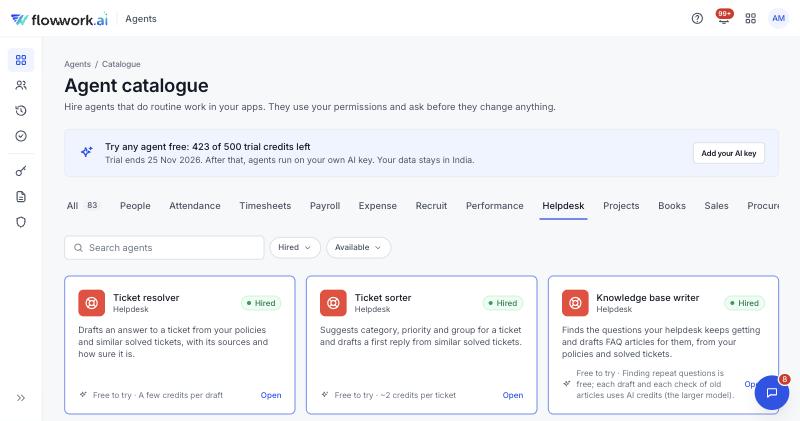
Three AI agents in the Helpdesk tab of the agent catalogue help the people who work tickets. The Ticket resolver drafts an answer to a ticket from your company's policies and similar solved tickets. The Ticket sorter suggests a category, priority and group for a ticket and drafts a first reply. The Knowledge base writer finds the questions your helpdesk keeps getting and drafts FAQ articles for them. All three work with your own login and change nothing until you confirm.
Don't mix these up with Agents and roles in Helpdesk's own menu. Those are the people in your company who work tickets. The agents on this page are AI agents.
Before you start
- Agents are a paid add-on. AI agents must be switched on for your company. If you don't see Agents in flowwork's menu, ask your admin.
- An agent must be hired before anyone can use it. You need the Manage agents permission to hire one. Go to Agents › Catalogue, select the Helpdesk tab, open the agent and select Hire agent.
- When you hire an agent you choose Who can use it: everyone in the company, or Only people with some roles. For the Ticket resolver and the Ticket sorter, choose the roles of the people who work tickets. Their ticket lists show all open tickets of your company, not only yours.
- You also set a Monthly credit limit. The agent stops for the month when it reaches the limit.
- The Knowledge base writer also needs permission to create or manage company documents in People.
- The Ticket resolver and the Knowledge base writer answer from your policies. Your policies must be synced in Agents › Knowledge, and only policies shared with everyone are used.
Helpdesk agents
| Agent | What it does | Changes only after your Confirm | Cost (estimate) |
|---|---|---|---|
| Ticket resolver | Drafts an answer to an open ticket from your policies, similar solved tickets and, for leave questions, the requester's leave balances when you may see them. Shows its sources and how sure it is. | Sending the answer to the requester, as your reply | A few credits per draft (larger AI model) |
| Ticket sorter | Suggests the category, priority and group for an open ticket from your own Helpdesk lists, says why, and drafts a first reply from similar solved tickets. | Setting the three fields, and adding the reply as an internal note | About 2 credits per ticket |
| Knowledge base writer | Groups your solved tickets by question, lists questions asked 3 or more times, and drafts an FAQ article for one. Can check published articles against newer tickets. | Publishing the article in People › Documents, shared with everyone | Finding repeat questions is free; drafts and checks use the larger AI model |
Read the full guide with your flowwork account
The rest of this page has the steps, screenshots and tips. Anyone at a company that uses flowwork can read every page, and ask the Help assistant about it.