
HelpdeskWorking tickets
Replies and internal notes
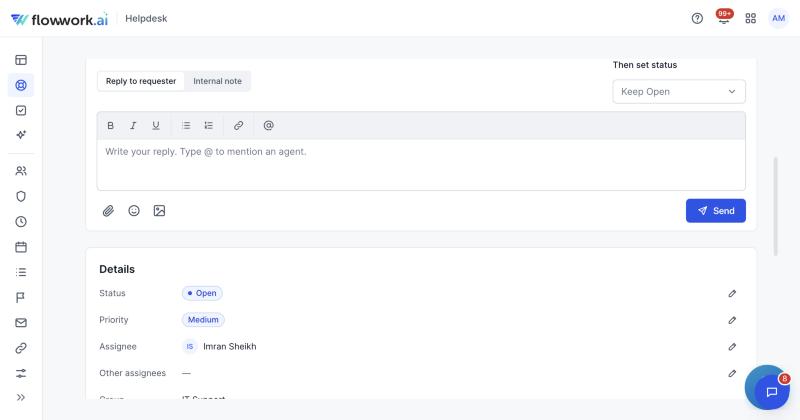
The Conversation tab is where you talk to the requester and to other agents. A reply goes to the requester. An internal note is for agents only: requesters don't see it in Helpdesk. Both can carry files, emoji and GIFs, and you can @mention people to email them.
Before you start
- You need the helpdesk role permission to add comments. Without it you see You can't reply on this ticket.
- You can't write on a closed ticket. Only the person who raised it can reopen it.
Send a reply
- On the ticket, open the Conversation tab.
- Under the messages, keep Reply to requester selected.
- Write your message. Type @ to mention someone (see below).
- Optionally, attach files with the paperclip, or paste a screenshot.
- Optionally, pick a status in Then set status, for example "Waiting on requester". Keep leaves the status as it is.
- Select Send.
You see Reply sent. If the status couldn't change, you see Sent, but the status didn't change.
Read the full guide with your flowwork account
The rest of this page has the steps, screenshots and tips. Anyone at a company that uses flowwork can read every page, and ask the Help assistant about it.
Every step, in order Real screenshots The agents that help
New companies use flowwork free until 31 December 2026