
HelpdeskWorking tickets
The tickets list
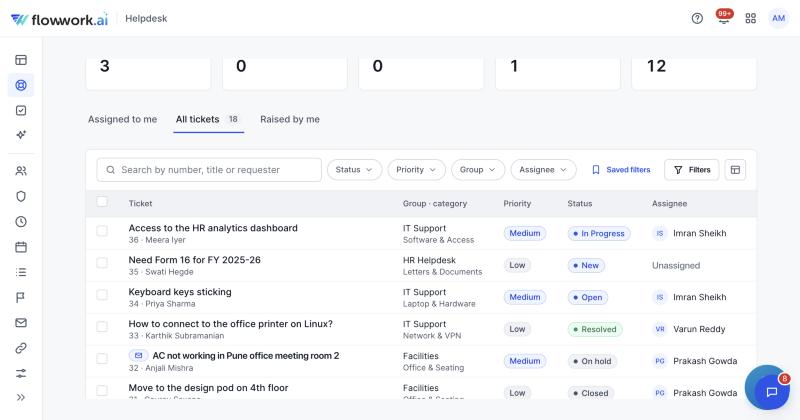
Tickets is where you work. It shows the tickets you can pick up, in tabs, with search, filters you can save, columns you choose and a download. Select a row to open the ticket; Ctrl-click (Cmd-click on a Mac) opens it in a new tab.
Before you start
- Everyone sees Tickets in the Helpdesk menu. What you see on it depends on your helpdesk role, set in Setup › Agents and roles. See Who can do what.
- People with no helpdesk role see My tickets instead: only the tickets they raised. See Your tickets.
The tabs you see
| Your helpdesk role | Tabs |
|---|---|
| Admin or Agent, or the platform permission Helpdesk administration | Assigned to me, All tickets, Raised by me |
| Contributor | Raised by me, Assigned to me |
| Client Admin | All tickets, My tickets |
- Assigned to me: tickets where you are the assignee or one of the other assignees.
- All tickets (Admin and Agent): tickets of the groups you're a member of. With the Admin role, tickets of every group.
- All tickets (Client Admin): tickets of the client accounts you belong to.
- Raised by me / My tickets: tickets you raised yourself.
The open tab shows its number of tickets. Changing tabs clears the search and sorting.
Read the full guide with your flowwork account
The rest of this page has the steps, screenshots and tips. Anyone at a company that uses flowwork can read every page, and ask the Help assistant about it.
Every step, in order Real screenshots The agents that help
New companies use flowwork free until 31 December 2026