
HelpdeskYour tickets
Raise a ticket
Raise a ticket when you need help from a team in your company, for example "Laptop won't charge" for IT or "Payslip shows wrong PF" for payroll. You pick the group that should handle it, describe the problem and add files. The group's agents get an email straight away.
Before you start
- Anyone who can open Helpdesk can raise a ticket. No permission is needed.
- Know which group should handle it, for example IT, HR or Finance. Your admin sets up the groups.
- Have screenshots or documents ready if they help explain the problem.
Raise the ticket
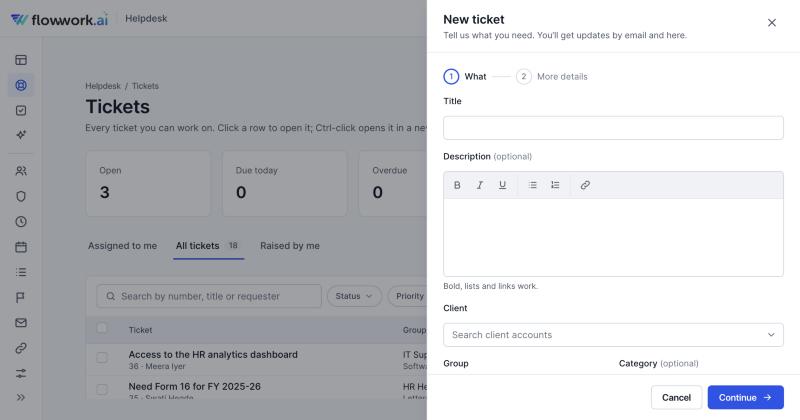
- In Helpdesk, select My tickets (agents: Tickets), then New ticket.
- In Title, say in a few words what you need, for example "Access to the VPN".
- Optionally fill in Description. Bold, lists and links work.
- If you see Client, pick the client account the ticket is about.
- In Group, pick the team that should handle it. The default group is picked for you.
- Optionally pick a Category. Each group has its own categories.
- Optionally pick a Priority and a Type.
- Optionally add Tags: type a tag and press Enter.
- Optionally drop files on the upload box, or select it to pick files.
- Select Continue.
- On More details, fill in the fields your company set up. Fields marked as required must be filled.
- Select Raise ticket.
Helpdesk opens the new ticket. You see "ticket number raised".
Read the full guide with your flowwork account
The rest of this page has the steps, screenshots and tips. Anyone at a company that uses flowwork can read every page, and ask the Help assistant about it.
Every step, in order Real screenshots The agents that help
New companies use flowwork free until 31 December 2026