
ChatChats and groups
Home: your conversations
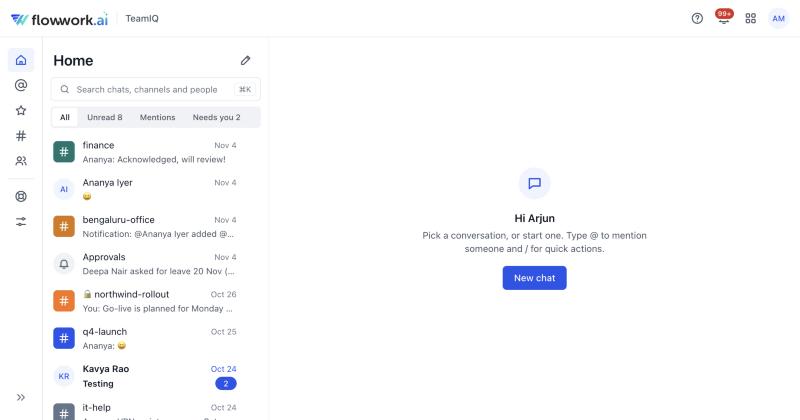
Home lists every conversation you're in, the newest first: direct chats, groups, channels and bots. Each row shows who wrote last and the start of the message. From here you filter, search, pin the chats you use most and mute the noisy ones.
Before you start
- You don't need any permission. Home shows the direct chats, groups and channels you're a member of. Channels you left, or that were deleted or archived, drop off.
- A conversation appears on Home once it has a message, or once you start it.
Read the list
Each row shows:
- the picture or icon: a person's photo or initials, # for a channel, a group icon, or a bell for a bot such as Approvals,
- the name, with 🔒 for a private channel,
- the time of the last message and a preview like You: … or Ananya: … (No messages yet for an empty channel),
- a blue count of unread messages, or @ when someone mentioned you there,
- 📌 for a pinned conversation and 🔕 for a muted one. Muted conversations never show in bold.
Select a row to open the conversation. Opening it marks it as read.
Read the full guide with your flowwork account
The rest of this page has the steps, screenshots and tips. Anyone at a company that uses flowwork can read every page, and ask the Help assistant about it.
Every step, in order Real screenshots The agents that help
New companies use flowwork free until 31 December 2026