
ChatStart here
What Chat does, and the menu
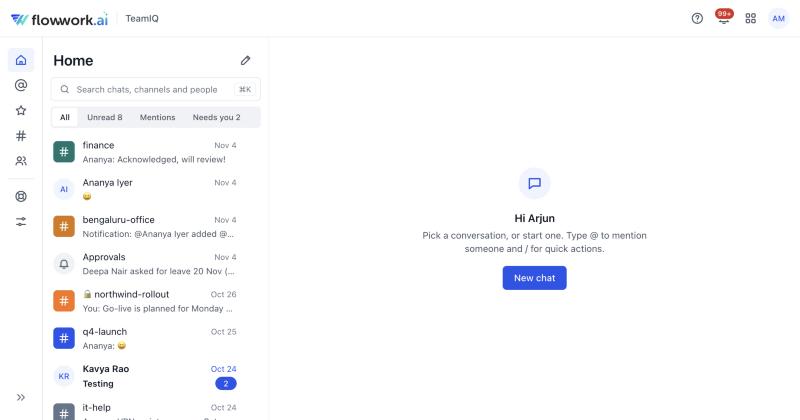
Chat is flowwork's messaging app, called TeamIQ on screen. You talk one to one, in small groups and in channels for a team or a topic. You mention people, reply in threads, share files, run quick polls and search old messages. Leave and expense approvals also arrive in Chat as cards you can approve without leaving it. A small chat window sits in the corner of the other flowwork apps, so you can answer without switching.
Before you start
- Open Chat from the app launcher (the grid at the top right). The tile opens TeamIQ at
/messageson your company's flowwork address. - Everyone who can sign in to your company's flowwork can use Chat. There is no Chat permission to give or take away.
- You can message the people your company allows. By default that's your company's employees. An admin can widen it in Admin › Settings › Chat; see Who can see what.
The menu
The narrow menu on the left has these items.
| Item | What it's for | Who sees it |
|---|---|---|
| Home | Your conversations, newest first, with filters and a search box. | Everyone |
| Mentions | Messages where someone @mentioned you. | Everyone |
| Starred | Messages you starred to find again. | Everyone |
| Browse channels | Every channel you can find, and Create channel. | Everyone |
| People | Who's online now, or everyone, with a Message button. | Everyone |
| Bots | Bots that post into chat from other systems. | People whose role includes basic access (most roles); see Bots |
| Support inbox | The flowwork support team's inbox. | Only the flowwork support team |
The top bar has the flowwork logo (back to your dashboard), the ? Help menu, the bell, the app launcher and your account menu.
Read the full guide with your flowwork account
The rest of this page has the steps, screenshots and tips. Anyone at a company that uses flowwork can read every page, and ask the Help assistant about it.
Every step, in order Real screenshots The agents that help
New companies use flowwork free until 31 December 2026