
TimesheetsSetup
Pay rules: day types and rates
Pay rules decide how Pay and revenue works out each day: whether the feature is on, what you call a client, the day types, and the rates for base pay, commission and the client's fee. They apply to the whole company.
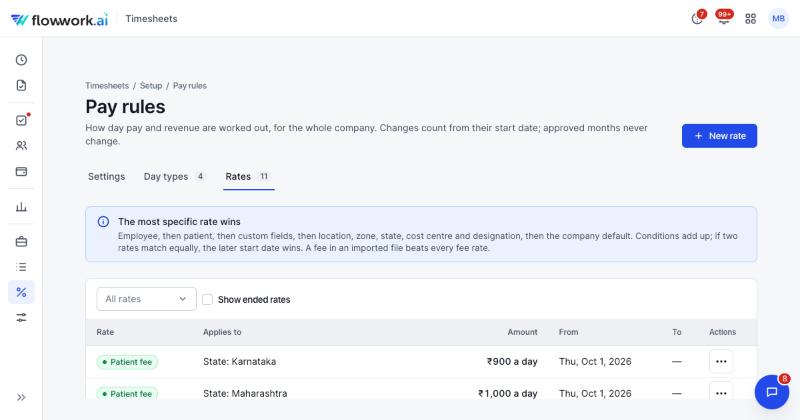
Before you start
- You need Timesheets setup access (allow_manage_timesheet_settings). Without it, Pay rules isn't in the menu.
- Pay and revenue is off for every company until you turn it on here. Nothing changes for anyone until then.
- It's meant for staff paid by the day or by the visit, with a base amount and a commission, such as home-care or field staff.
Turn on Pay and revenue
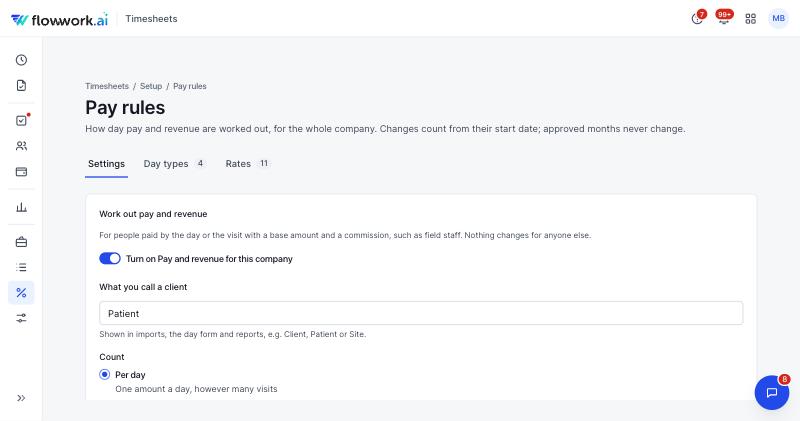
- Go to Timesheets › Setup › Pay rules. It opens on Settings.
- Turn on Turn on Pay and revenue for this company.
- Fill in the settings below.
- Select Save changes. You see "Pay rules saved".
Turning it on adds Pay and revenue to the Team menu for managers and for people with View pay and revenue, and creates three day types to start with. Turning it off hides the page again; the days and rates are kept.
Read the full guide with your flowwork account
The rest of this page has the steps, screenshots and tips. Anyone at a company that uses flowwork can read every page, and ask the Help assistant about it.
Every step, in order Real screenshots The agents that help
New companies use flowwork free until 31 December 2026