
FormsBuild a form
Change a form's look (Theme)
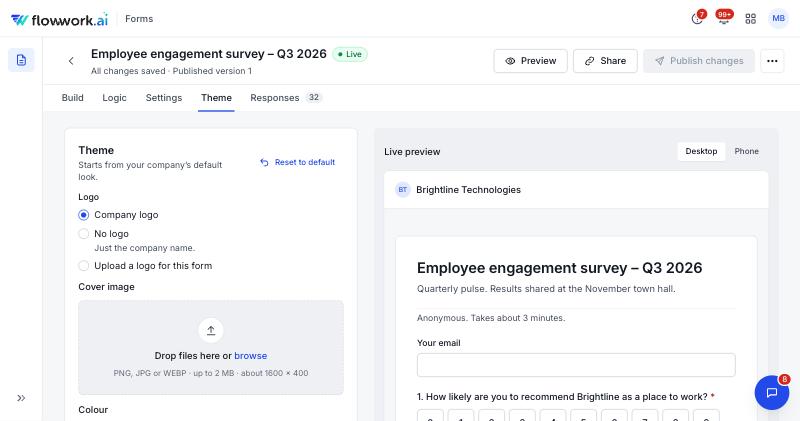
The Theme tab sets how the form looks to the people answering it: logo, cover image, colour, font, the text on the last button, and the "Made with flowwork.ai" line. A new form starts from your company's default look.
Before you start
- You need the Owner or Editor role on the form. Viewers see the tab with everything greyed out and "Only editors can change the theme".
- Uploading a logo or cover image needs file uploads set up for your company (the portal file key). Without it, the upload fails.
- Your company's default look is set in Settings. See Forms settings.
Change the look
- Open the form and select the Theme tab.
- Under Logo, pick one:
- Company logo: your company's logo from Admin. If your company has none, a round badge with its initials shows.
- No logo: just the company name.
- Upload a logo for this form: then drop a Logo image in the box. PNG, JPG or WEBP, up to 2 MB, about 240 × 80.
- Optionally, add a Cover image shown across the top: PNG, JPG or WEBP, up to 2 MB, about 1600 × 400. Select Remove to take it off.
- Pick a Colour: Blue, Indigo, Purple, Pink, Red, Orange, Green or Black. Or select Custom and pick a colour or type a hex code like #2554EB. Text on the colour is set to black or white, whichever reads better.
- Pick a Font: Inter (default), Noto Sans (Indian scripts) or System font.
- Change the Button text on the last page if you like, for example "Register" (up to 40 characters; default "Submit").
- Turn Show "Made with flowwork.ai" on or off.
- Check the Live preview on the right. Switch between Desktop and Phone.
- Select Save changes. You'll see Theme saved.
To throw away what you changed since the last save, select Discard.
Read the full guide with your flowwork account
The rest of this page has the steps, screenshots and tips. Anyone at a company that uses flowwork can read every page, and ask the Help assistant about it.
Every step, in order Real screenshots The agents that help
New companies use flowwork free until 31 December 2026