
FormsResponses
Response emails and clean-up
Forms can email you when someone answers: one email for each response, or one summary at the end of the day. This page explains who gets these emails, what's in them, and how long responses are kept before they're deleted.
Before you start
- Emails go to the form's collaborators (the people listed on its Settings tab) and to the extra addresses under Also tell. See Form settings.
- You can change your own emails on any form you're a collaborator on. To change the switch, Also tell or other people's emails, you must be an Owner or Editor of the form.
- To change how long responses are kept, you need Manage Forms settings.
Choose your emails
- Open the form and select the Settings tab.
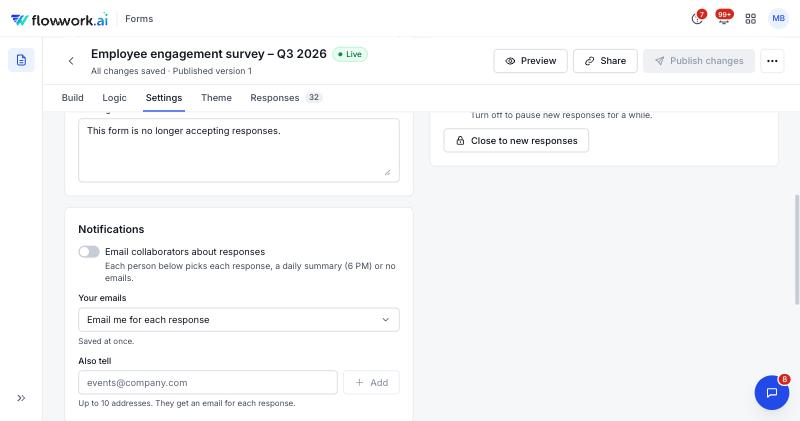
- Under Notifications, make sure Email collaborators about responses is on.
- In Your emails, pick:
- Email me for each response
- Send me a daily summary instead
- No emails
Your choice is saved at once. Owners and editors can also change it for someone else from that person's menu in the collaborators list: Email for each response, Daily summary instead or No emails.
Read the full guide with your flowwork account
The rest of this page has the steps, screenshots and tips. Anyone at a company that uses flowwork can read every page, and ask the Help assistant about it.
Every step, in order Real screenshots The agents that help
New companies use flowwork free until 31 December 2026