
FormsResponses
Answers by question
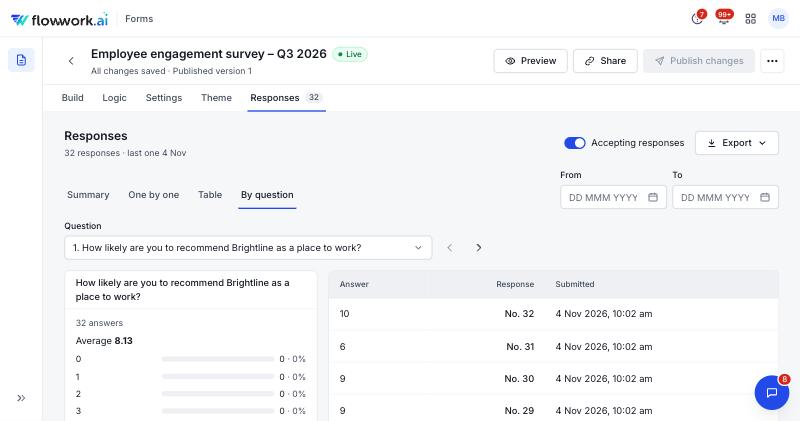
By question shows every answer to one question, newest first, next to that question's summary. Use it to read all the written answers to a question, or to step through the form one question at a time.
Before you start
- Any role on the form can use this view, and so can people with the permission to see all forms. See Who can do what.
- The form needs a published version.
Read the answers to a question
- Open the form, select the Responses tab, then By question.
- Pick a question in Question. The first question is picked when you open the view.
- Use the left and right arrows next to it to go to the previous or next question.
- Read the answers in the list. Each row shows the Answer, the Response number and when it was Submitted.
- Select a row or its No. to open that whole response in One by one.
The list shows 20 answers a page. Use the page buttons under it for more.
Read the full guide with your flowwork account
The rest of this page has the steps, screenshots and tips. Anyone at a company that uses flowwork can read every page, and ask the Help assistant about it.
Every step, in order Real screenshots The agents that help
New companies use flowwork free until 31 December 2026