
PerformanceGoals and OKRs
Company, department and team OKRs
Shared objectives are the goals everyone works towards: company objectives, department objectives and team objectives. Everyone in the company can see them, and people align their own goals to them.
Before you start
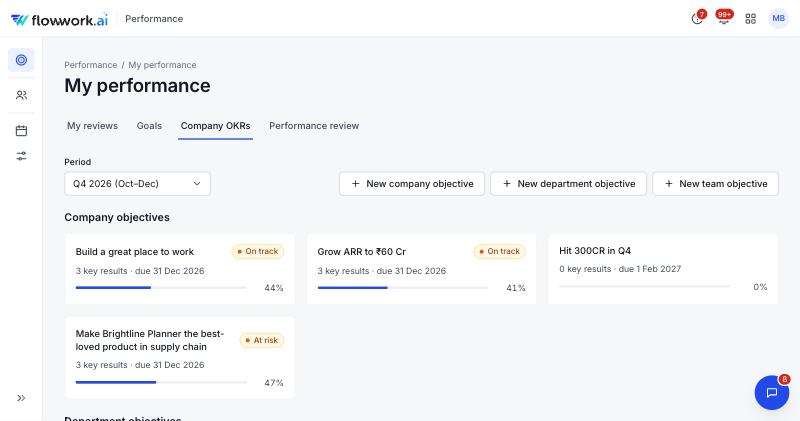
- Everyone can view shared objectives. Go to Performance › My performance and open the Company OKRs tab.
- Company and department objectives are created by HR: people with the permission to manage performance (
allow_manage_performance_cycles). - Team objectives are created by people managers (anyone with direct reports in People) and by HR.
- You only see the New … objective buttons you're allowed to use.
View shared objectives
- Open the Company OKRs tab.
- Pick a quarter under Period, or All periods. The list starts on the current quarter and offers the two quarters before and after.
- Objectives are grouped under Company objectives, Department objectives and Team objectives. Each tile shows the name, the confidence, the number of key results, the due date and the progress.
- Select a tile to open its page.
An objective shows in a quarter when its target dates overlap that quarter.
Read the full guide with your flowwork account
The rest of this page has the steps, screenshots and tips. Anyone at a company that uses flowwork can read every page, and ask the Help assistant about it.
Every step, in order Real screenshots The agents that help
New companies use flowwork free until 31 December 2026