
PerformanceSettings
Build your question library
The question library holds every question your company asks in reviews. Questions sit in a category, and inside a category in a section. You pick questions from the library when you build a question template, and a review cycle asks the questions of its question template.
Before you start
- You need the permission to manage performance cycles. Without it you don't see Admin › Settings in the Performance menu.
- Find the page under Settings › Templates › Question library.
- Plan your categories first, for example "Leadership" or "Customer focus" at Brightline. Each category has its own sections, such as "Communication" or "Ownership".
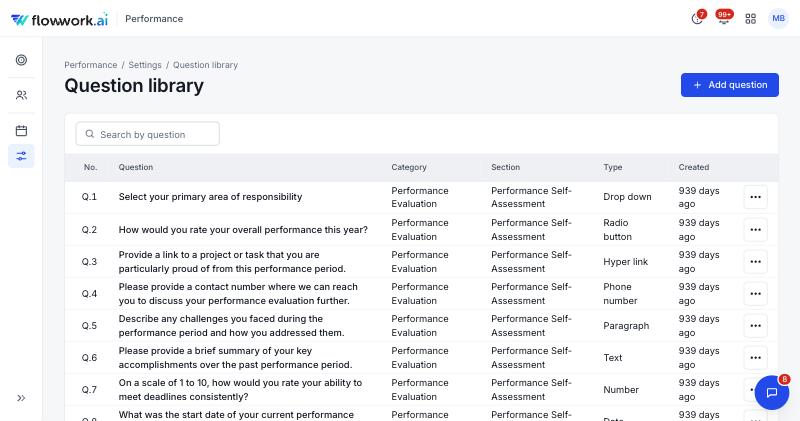
What the list shows
Each row has the question number (No.), the Question, its Category and Section, the field Type and when it was Created ("Today", "3 days ago").
- Type in Search by question to narrow the list. The search text stays in the page address, so you can share the filtered list.
- The list shows 20 questions at a time. Select Load more for the next ones.
- Only your company's questions are listed. No questions come built in.
Read the full guide with your flowwork account
The rest of this page has the steps, screenshots and tips. Anyone at a company that uses flowwork can read every page, and ask the Help assistant about it.
Every step, in order Real screenshots The agents that help
New companies use flowwork free until 31 December 2026