
PerformanceMy performance
My reviews (what you have to do)
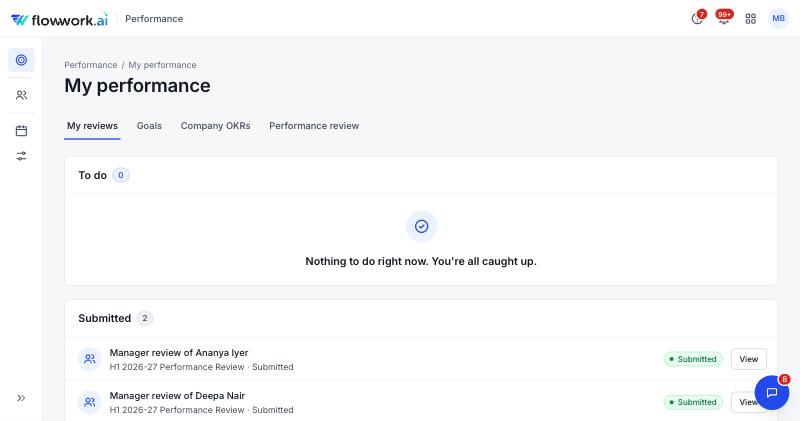
The My reviews tab lists everything you have to do in running review cycles, in one place: your self review, choosing your peers, the peer and manager reviews you were asked to write, and peers waiting for your approval.
Before you start
- You don't need a permission. You see work that is yours in cycles HR has started.
- Open it from My performance › My reviews. It's the tab the page opens on.
What's on the list
The list has two cards.
- To do, with a count. The count turns red when something is overdue.
- Submitted, with what you already sent.
Each row says what to do and in which cycle:
| Row | What it means |
|---|---|
| Your self review | Your own review |
| Choose the peers who review you | Nominate the colleagues who write your peer review |
| Peer review of a colleague | A colleague chose you as a peer |
| Manager review of an employee | You're one of that employee's managers in the cycle |
| Approve the peers of an employee | That employee nominated peers and the cycle needs a manager's approval |
Under each row you see when it's due:
- Due and a date while it's open,
- Opens on and a date when its dates haven't started,
- Overdue since and a date after its last day,
- Submitted once you sent it,
- No due date when the cycle set no dates for it.
Review rows also show their status: Yet To Start, Pending Review (you saved answers) or Submitted.
Read the full guide with your flowwork account
The rest of this page has the steps, screenshots and tips. Anyone at a company that uses flowwork can read every page, and ask the Help assistant about it.
Every step, in order Real screenshots The agents that help
New companies use flowwork free until 31 December 2026