
Agents in Workspace
Workspace has four AI agents for building software, called the GenSDLC agents. Thinko (Product Owner) turns an idea or a document into a requirement document. Arka (Solution Architect) turns an idea or a requirement into a design document. Devon (Developer, Beta) turns a design document into frontend and backend code. Lexi reads a codebase you upload and answers questions about it. Each agent saves its document into a realm or folder you choose, only when you select the create or save button.
A fifth agent, Chat-to-tasks, lives in flowwork's company agent catalogue. It turns a TeamIQ chat or meeting notes into tasks, and the tasks land in your Workspace lists after you confirm.
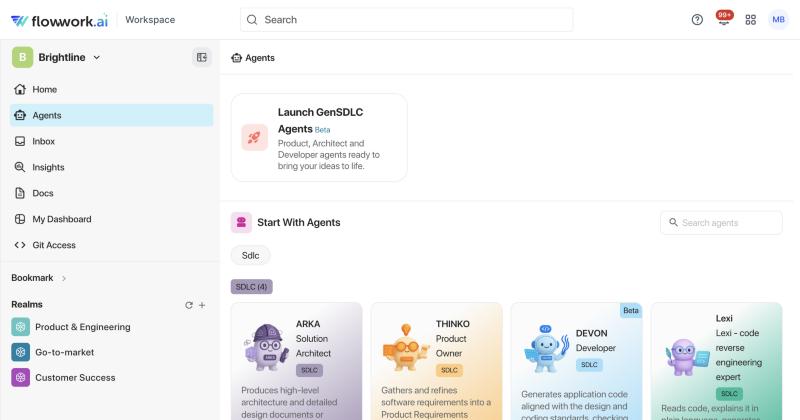
Before you start
- AI agents must be switched on for your company. If they are off, you don't see Agents in the sidebar, the three agent cards on Home, or Agents in an item's ... menu. Ask your admin.
- You don't hire the GenSDLC agents. Everyone who can open Workspace can use them once AI agents are on. They don't ask for any extra permission.
- Workspace doesn't show a credit cost for the GenSDLC agents.
- To save an agent's document you pick a realm, bucket, folder or sprint suite. You can't save into a list, a sprint, a test suite or a document.
- Chat-to-tasks is different: someone with the Manage agents permission must hire it first, in flowwork's Agents › Catalogue. See Chat-to-tasks below.
The Workspace agents
| Agent | What it does | Saved only after you select | Where the result goes |
|---|---|---|---|
| Thinko (Product Owner) | Asks about your idea or reads your uploaded document, and drafts a requirement document. You refine it in chat. | Create or Create Document | A page called Requirement Document in the realm or folder you picked |
| Arka (Solution Architect) | Drafts a design document with low-level details, from your idea, an uploaded requirement or an existing page. | Create or Create Document | A page called Architect Document |
| Devon (Developer, Beta) | Reads a design document or a design link, asks you questions, then generates frontend and backend code. Currently supports ReactJS, Spring Boot, .NET, PostgreSQL and MongoDB. | Nothing is saved in Workspace. You view, edit and download the code in Devon's window. | Devon's own code window, with Download as ZIP |
| Lexi | Reads a codebase you upload as a .zip file and answers your questions about it. | Save As Document | A page called Code analysis Document with your conversation |
How to use each one: GenSDLC agents.
Read the full guide with your flowwork account
The rest of this page has the steps, screenshots and tips. Anyone at a company that uses flowwork can read every page, and ask the Help assistant about it.