
What Workspace does
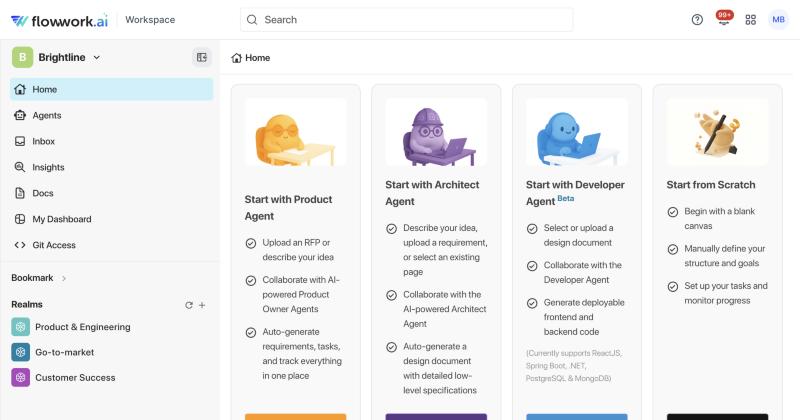
Workspace is where your teams plan and track work. You keep work in realms. A realm holds folders, lists of tasks, sprints, test suites, documents, forms and dashboards. You see tasks in different views, such as a list or a board, and follow them through their statuses. Workspace also has Docs for written pages, an Inbox for updates about your work, and, if your company uses AI agents, agents that draft requirement documents, design documents and code for you.
Before you start
- Open Workspace from the app launcher (the grid at the top right). The tile is called Workspace. If you don't see it, your company doesn't have Workspace turned on. Ask your admin.
- You need the View workspace or Manage workspace permission. Without either, Workspace shows a message that you are not authorized to access the page, with a Go To Home button.
- What you can do inside a realm also depends on your role in that realm. See Who can do what.
- The agent cards on Home and Agents in the sidebar show only when AI agents are switched on for your company.
How Workspace is organised
Work in Workspace sits in layers. Each layer lives inside the one above it.
| Layer | What it is | Example |
|---|---|---|
| Workspace | The top level. A company can have several workspaces, for example one per department or client. You switch between them at the top of the sidebar. | Brightline Delivery |
| Realm | A project or team area inside a workspace, with its own members, statuses, task types and settings. Realms are listed under Realms in the sidebar. | Website relaunch |
| Bucket and Folder | Groups inside a realm, to sort lists and documents. | Design, Build |
| List | A list of tasks. Tasks always live in a list. | Sprint backlog |
| Sprint Suite and Sprint | Time-boxed groups of tasks for teams that work in sprints. | Q4 sprints, Sprint 12 |
| Test Suite | Test cases and test runs, for QA teams. | Checkout tests |
| Document | A page of text inside a realm. | Requirement Document |
| Repository | A link to a code repository from GitHub or GitLab. | brightline-web |
To add any of these, use the + (Add) button next to an item in the sidebar. See Realms and how they're structured.
Read the full guide with your flowwork account
The rest of this page has the steps, screenshots and tips. Anyone at a company that uses flowwork can read every page, and ask the Help assistant about it.