
WorkspaceRealms and structure
Realms and their structure
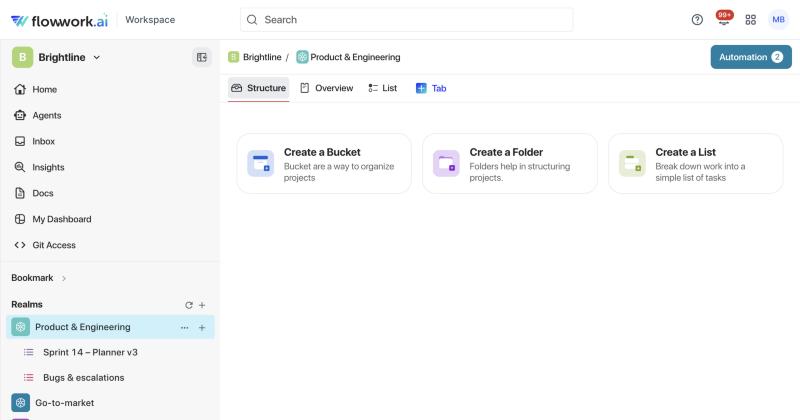
A realm is the top container for one area of work, such as "Product & Engineering" or "Customer Success". Inside a realm you build a structure of buckets, folders and lists, and tasks live in lists. If the realm has the sprint add-on, it can also hold sprint suites with sprints. This page explains the building blocks and how to create, change, move and remove them.
Before you start
- To create a realm you need permission to add realms. The + next to Realms in the sidebar shows only if you have it.
- To add folders, lists and other items inside a realm you need the matching add permission, for example to add lists. Without any of them, the realm's + menu shows Limited Permission.
- See Who can do what for the full list.
The building blocks of a realm
| Item | What it is for |
|---|---|
| Realm | The top level, one per team, department or big project. It has its own members, statuses, types and fields. |
| Bucket | An optional group directly under a realm, for a set of related folders and lists. |
| Folder | A container for lists. It can sit directly in a realm or inside a bucket. |
| List | Where tasks live. Every task belongs to at least one list. |
| Sprint Suite and Sprint | A sprint suite holds a series of time-boxed sprints. Each sprint works like a list of tasks with start and end dates. See Sprints. |
| Document | A page of text inside a bucket, folder or list. See Docs. |
Realms can also hold test suites and code repositories when those add-ons are on. See Test suites and Repositories.
Read the full guide with your flowwork account
The rest of this page has the steps, screenshots and tips. Anyone at a company that uses flowwork can read every page, and ask the Help assistant about it.
Every step, in order Real screenshots The agents that help
New companies use flowwork free until 31 December 2026