
WorkspaceInbox, Insights and My Dashboard
Insights (ask about your work)
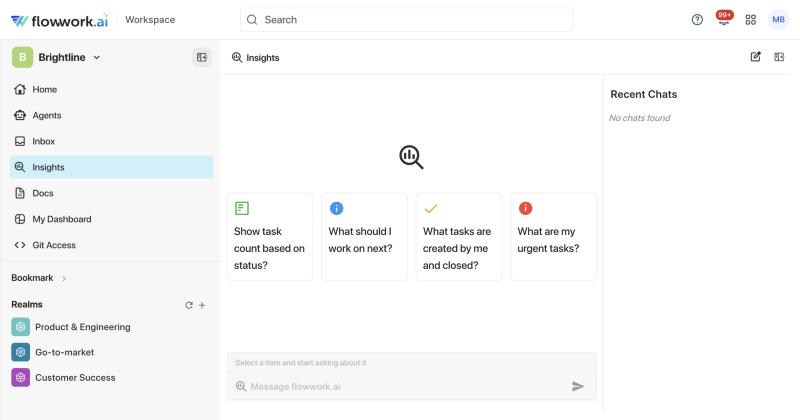
Insights is an AI chat about your work in Workspace. You ask a question in plain words, such as "What are my urgent tasks?", and it answers from the tasks in this company. You can point it at one realm, folder or list to narrow the answer.
Before you start
- You need the permission to generate insights. Without it, Insights doesn't appear in the sidebar. Your admin gives it by editing roles in Admin. See Who can do what.
- Answers are made by AI. Check important numbers against the list itself.
Ask a question in Insights
- In the sidebar, select Insights.
- Optionally, in Select a item and start asking about it, pick a realm, bucket, folder, sprint or list. Docs and repositories can't be picked.
- Type your question in Message flowwork.ai and press Enter, or select the send arrow.
The answer appears in the chat. Select Copy under an answer to copy it. Keep asking follow-up questions in the same chat.
To start, you can also select one of the suggested questions: Show task count based on status?, What should I work on next?, What tasks are created by me and closed? or What are my urgent tasks?
Read the full guide with your flowwork account
The rest of this page has the steps, screenshots and tips. Anyone at a company that uses flowwork can read every page, and ask the Help assistant about it.
Every step, in order Real screenshots The agents that help
New companies use flowwork free until 31 December 2026