
CRMDeals
A deal's page
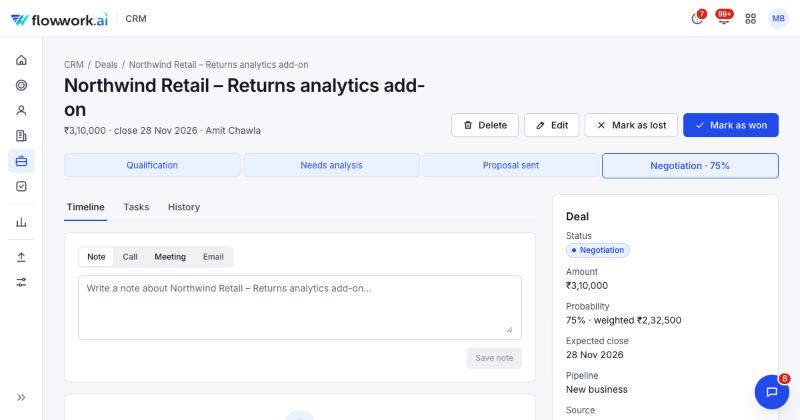
Everything about one deal is on its page: where it is in the pipeline, how likely it is, who the customer is, what has happened so far and what's next. Open it from the board, the list, or a company or contact page.
Before you start
- You can open a deal if you own it, if its owner reports to you in People, if it has no owner, or if you can see everything in CRM. Any other deal shows as not found.
- To change anything on the page you need permission to manage deals. Without it you can read the page, but the buttons and the stage bar don't work.
What's on the page
- Under the title: the amount, the expected close date (open deals) and the owner.
- The stage bar (open deals): the pipeline's open stages in order. Past stages are marked, and the current one shows the probability in use.
- Won or Lost banner (closed deals): the date it closed, the reason and the note.
- Deal card: Status, Amount, Probability with the weighted amount, Expected close, Products, Pipeline, Source, Owner, Last activity and Tags.
- More details: your company's own fields that have a value.
- Customer card: the Company and Contacts, with links, and From lead if the deal came from a converted lead.
- Tabs: Timeline, Quotes, Tasks and History. Quotes lists the FlowBooks quotes made from the deal, with their status. See Quotes from a deal.
- Create quote (open deals, if you manage deals) opens the quote drawer.
Read the full guide with your flowwork account
The rest of this page has the steps, screenshots and tips. Anyone at a company that uses flowwork can read every page, and ask the Help assistant about it.
Every step, in order Real screenshots The agents that help
New companies use flowwork free until 31 December 2026