
CRMStart here
Home
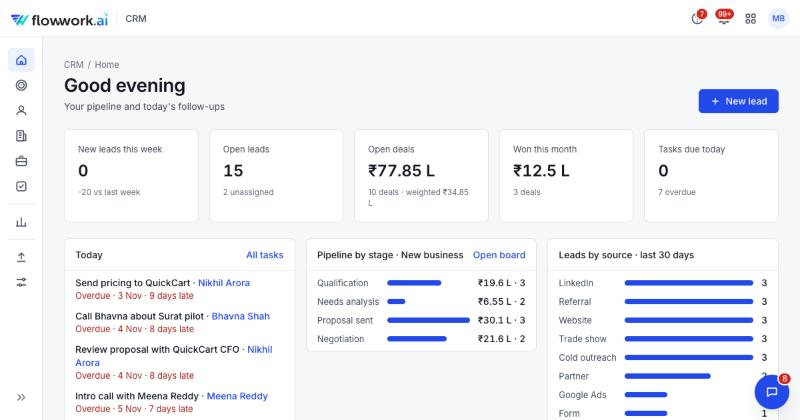
Home is the first page you see in CRM. It shows your numbers, your follow-ups for today and your pipeline, counting only the records you're allowed to see. Every number and row opens the list behind it.
Before you start
- Everyone with access to CRM has a Home page.
- What it counts depends on what you can see: your own records, your team's and unassigned ones, or everything if you can view all. See Who can see what.
The numbers at the top
Select a number to open the list it counts. The list opens already filtered the way Home counts it, so you see the same records.
- New leads this week: leads created in the last 7 days, compared with the 7 days before. Opens Leads with Created this week; converted leads are included, as on Home.
- Open leads: leads that are New, Contacted or Qualified. Below it, how many open leads are unassigned. Opens Leads with Open leads.
- Open deals: the total amount of open deals in all pipelines, how many there are, and the weighted amount (each amount times its probability). Opens the deals list with All pipelines.
- Won this month: the amount and number of deals won this calendar month (India time). Opens the deals list with Won this month.
- Tasks due today: your open tasks due in the next 24 hours, and how many of yours are overdue. Opens Tasks with Due today; overdue tasks aren't in it.
Read the full guide with your flowwork account
The rest of this page has the steps, screenshots and tips. Anyone at a company that uses flowwork can read every page, and ask the Help assistant about it.
Every step, in order Real screenshots The agents that help
New companies use flowwork free until 31 December 2026