
CRMActivities and tasks
Tasks
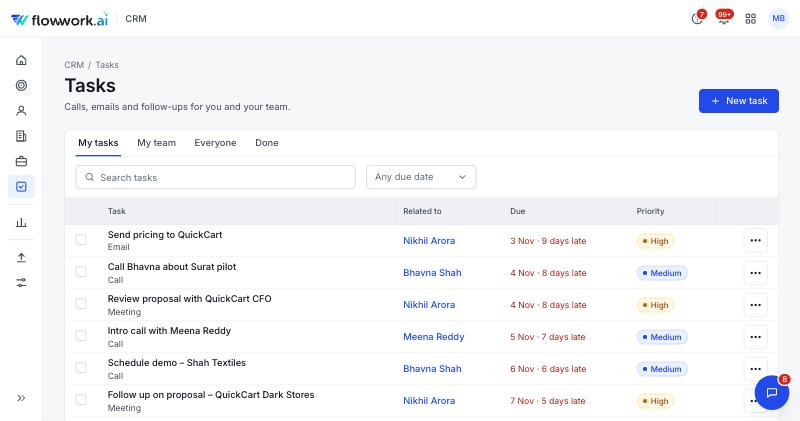
Tasks are your follow-ups: calls to make, emails to send, meetings and to-dos. Each task has a due date, a priority and the person it's assigned to. Most belong to a lead, contact, company or deal. The Tasks page lists what's on your plate and your team's.
Before you start
- Everyone with CRM access can see their own tasks.
- To add, edit, complete or delete tasks you need one of the CRM permissions to manage leads, customers, deals or settings. Without one, you see the list but can't change it.
- The Everyone tab only shows if you can see all of CRM.
The tabs
- My tasks: open tasks assigned to you.
- My team: open tasks assigned to you and to everyone who reports to you in People, directly or further down. The Assigned to column shows whose they are.
- Everyone: every open task in your company.
- Done: tasks assigned to you that are done, newest first.
Read the full guide with your flowwork account
The rest of this page has the steps, screenshots and tips. Anyone at a company that uses flowwork can read every page, and ask the Help assistant about it.
Every step, in order Real screenshots The agents that help
New companies use flowwork free until 31 December 2026