
CRMDeals
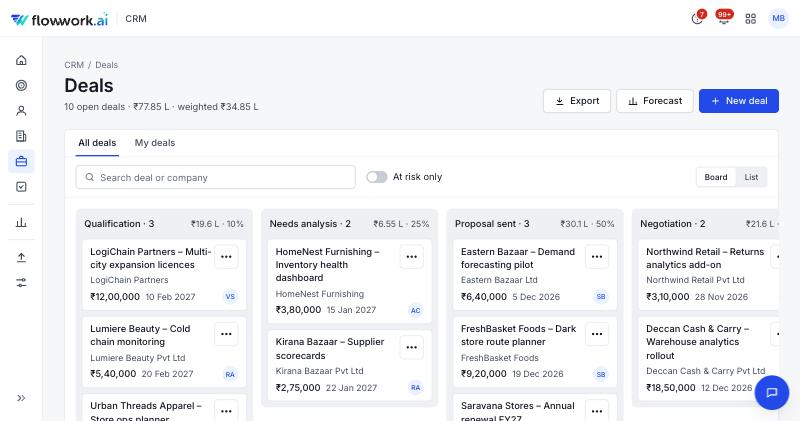
The deals board
Deals shows your open deals as cards in one column per stage, so you can see what's moving and what's stuck, plus the deals won or lost in the last 30 days. Drag a card to move a deal on. Switch to List for a table you can sort and page through, with won and lost deals of any date.
Colours tell you the status everywhere on the page: blue is open, green is won, red is lost.
Before you start
- You need access to CRM to see deals.
- To add, move, edit or close deals you need permission to manage deals. Without it you can open deals and look, but cards don't drag and the card menu only has Open.
- Export shows only if you may export CRM data.
Which deals you see
- All deals (if you can see everything in CRM) or All I can see (everyone else): your own deals, the deals of people who report to you in People, at any level, and deals with no owner.
- My deals: only deals you own.
- Deals owned by someone outside your team don't show at all.
Read the full guide with your flowwork account
The rest of this page has the steps, screenshots and tips. Anyone at a company that uses flowwork can read every page, and ask the Help assistant about it.
Every step, in order Real screenshots The agents that help
New companies use flowwork free until 31 December 2026