
LearningAgents in Learning
Agents in Learning
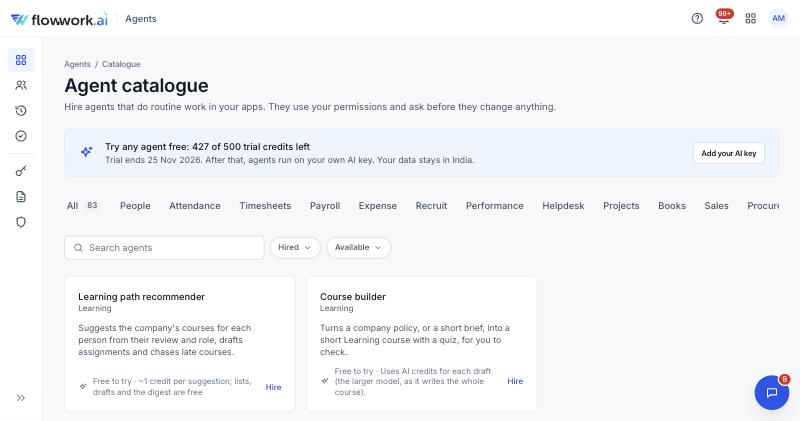
Two agents in the Learning tab of the agent catalogue help with training. The Course builder turns one of your company's policies, or a short brief, into a draft course with lessons and a quiz. The Learning path recommender suggests your company's courses for a person from their performance review and role, drafts assignments, and chases late courses. Both work with your own login, so they see only what you can see in Learning, People and Performance. Neither publishes a course, assigns one or sends a reminder until you confirm.
Before you start
- Agents are a paid add-on. AI agents must be switched on for your company. If you don't see Agents in flowwork's menu, ask your admin.
- An agent must be hired before anyone can use it. You need the Manage agents permission to hire one. Go to Agents › Catalogue, select the Learning tab, open the agent and select Hire agent.
- When your admin hires an agent, they choose Who can use it: everyone in the company, or Only people with some roles. They also set a Monthly credit limit. The agent stops for the month when it reaches the limit.
- Your company must also use Learning. The Course builder needs the Manage courses permission in Learning. The Learning path recommender works for everyone for their own courses; managers use it for their team, and assigning needs the Assign courses permission.
Learning agents
| Agent | What it does | Changes only after your Confirm | Cost (estimate) |
|---|---|---|---|
| Course builder | Drafts a short course from one company policy or a brief: 3 to 8 lessons, key points, a quiz of 5 to 10 questions with answers and explanations, and a pass mark. Every lesson and question names the policy part it came from. | Saving the course in Learning as a draft, as you | Uses the larger AI model, so each draft costs more credits than most agents |
| Learning path recommender | Suggests up to five published courses for you or someone in your team, from their latest review and role. Lists late courses in your team and drafts reminders. Can email you a weekly team digest. | Each course assignment; each reminder | About 1 credit per suggestion; lists, drafts and the digest are free |
Read the full guide with your flowwork account
The rest of this page has the steps, screenshots and tips. Anyone at a company that uses flowwork can read every page, and ask the Help assistant about it.
Every step, in order Real screenshots The agents that help
New companies use flowwork free until 31 December 2026