
LearningCourses
The courses list
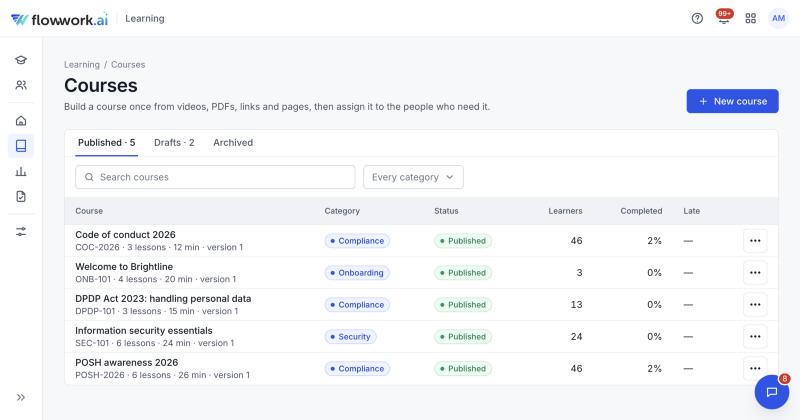
Courses lists every course your company has made in Learning, with how many people are on each and how many are late. From here you open a course, start a new one, make a copy, or archive one you no longer use.
Before you start
- You see Courses in the Learning menu if you can manage courses, assign courses, or view learning reports.
- Only people who can manage courses see New course and the actions menu on each row. Others can open a course and look at it, but not change it.
- Your company must have Learning turned on.
Find a course
- In Learning, select Courses.
- Pick a tab:
- Published: courses people can be assigned. This includes courses with unpublished edits.
- Drafts: courses that were never published.
- Archived: courses taken out of use.
- Type in Search courses to find a course by its title or code.
- Pick a category in the Every category list to see only that category.
- Select a course's title to open it.
The newest changed courses are at the top. The Published and Drafts tabs show how many courses they hold.
Read the full guide with your flowwork account
The rest of this page has the steps, screenshots and tips. Anyone at a company that uses flowwork can read every page, and ask the Help assistant about it.
Every step, in order Real screenshots The agents that help
New companies use flowwork free until 31 December 2026