
LearningReports and progress
Learners report and CSV export
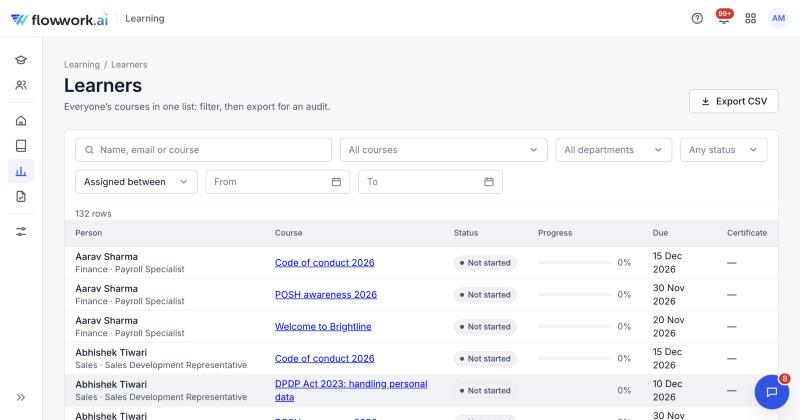
Learners is everyone's courses in one list: one row per person per course. Filter it by course, department, status or dates, then export it as a CSV file, for example for a compliance audit.
Before you start
- You need the View learning reports permission.
- People with only Assign courses don't see Learners in the menu. They see who is on one course from that course's Learners tab.
Filter the list
- Open Learners in the menu.
- Use any of these:
- Search: a person's name or email, or a course title.
- Course: courses that have people on them.
- Department: departments of the people on courses, or No department.
- Status: Late, Not finished, Not started, In progress or Completed.
- Dates: choose Assigned between, Due between or Completed between, then pick From and To.
- Select Clear to remove every filter.
The list shows how many rows match, 50 a page. The filters are kept in the page address, so you can bookmark or share a filtered view with a colleague who has the same permission.
Read the full guide with your flowwork account
The rest of this page has the steps, screenshots and tips. Anyone at a company that uses flowwork can read every page, and ask the Help assistant about it.
Every step, in order Real screenshots The agents that help
New companies use flowwork free until 31 December 2026