
LearningMy team
My team
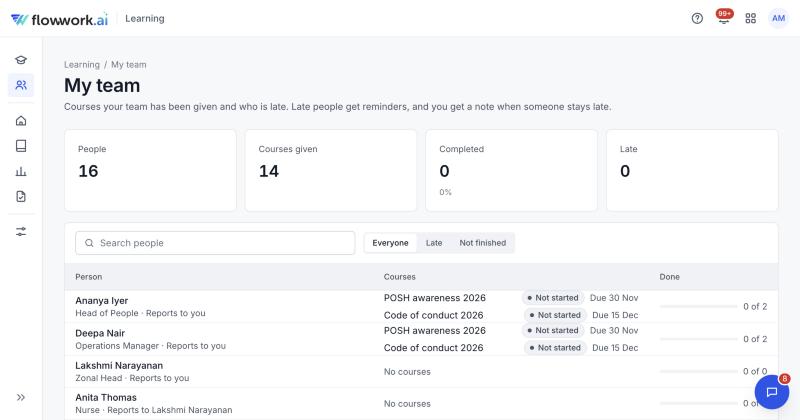
My team shows the courses of the people below you in People: who has finished, who is still on a course and who is late. It's read-only. Late people get reminders on their own, and you get a note when someone stays late.
Before you start
- You see My team in the menu when at least one person reports to you directly in People. You need no Learning permission.
- Reporting lines come from People. If someone is missing or in the wrong team, ask HR to fix their reporting manager in People.
- A change in People can take up to 5 minutes to show here.
Who counts as your team
- Everyone who reports to you directly, and everyone below them (their reports, and so on).
- A row says Reports to you for your direct reports, or Reports to
for people further down. - You aren't in your own list.
If the people further down can't be read from People right now, you see Showing your direct reports only ("People below them couldn't be read right now."). Open the page again later for the full list.
If nobody reports to you, you see Your team’s courses show up here, with a note that HR sets who reports to whom in People.
Read the full guide with your flowwork account
The rest of this page has the steps, screenshots and tips. Anyone at a company that uses flowwork can read every page, and ask the Help assistant about it.
Every step, in order Real screenshots The agents that help
New companies use flowwork free until 31 December 2026