
LearningCourses
Certificates for a course
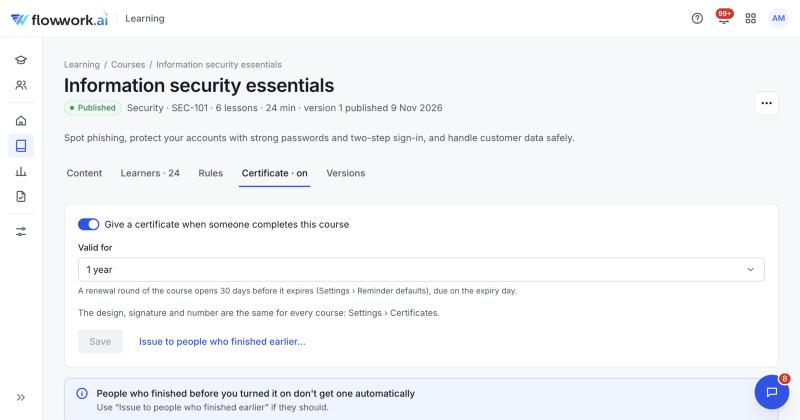
A course can give a certificate to everyone who completes it. You turn it on for each course on its Certificate tab, and choose how long it stays valid. When a certificate is about to expire, Learning opens a renewal round of the course for that person.
Before you start
- You need permission to manage courses to turn a certificate on or off.
- To issue certificates to people who finished earlier, you also need permission to assign courses.
- To see the list of issued certificates on this tab, you need permission to view learning reports.
- The look of the certificate is the same for every course. It is set in Learning › Settings › Certificates.
Turn on a certificate
- Open the course and select the Certificate tab.
- Turn on Give a certificate when someone completes this course.
- In Valid for, pick Never expires, 6 months, 1 year, 2 years, 3 years or 5 years.
- Select Save.
The tab then reads Certificate · on. Everyone who completes the course from now on gets a certificate and a notice.
Read the full guide with your flowwork account
The rest of this page has the steps, screenshots and tips. Anyone at a company that uses flowwork can read every page, and ask the Help assistant about it.
Every step, in order Real screenshots The agents that help
New companies use flowwork free until 31 December 2026