
LearningAssigning courses
Due dates and reminders
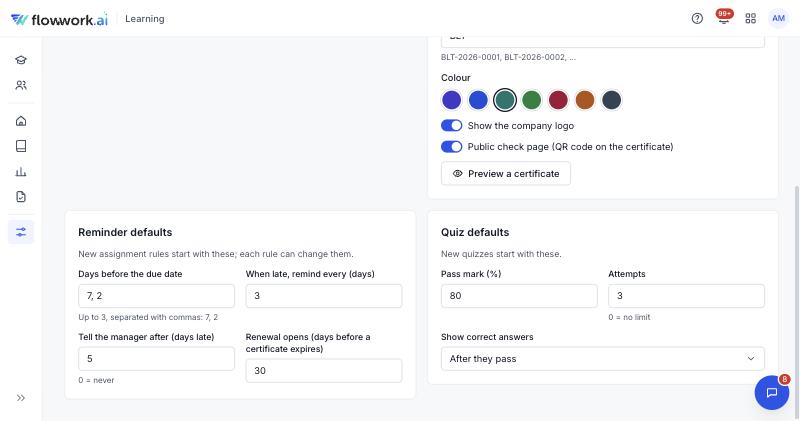
Learning reminds people before a course is due and while it's late, tells managers when their people stay late, and opens a renewal round before a certificate runs out. All of this happens on its own. Your company sets the timings once, in Settings › Reminder defaults.
Before you start
- To change the timings you need the Manage learning settings permission.
- To set or move due dates you need the Assign courses permission.
- Reminders only go out for courses with a due date.
Where due dates come from
- Assigned by hand: the date you pick in Assign people. It starts 30 days ahead and can't be in the past. See Assign people to a course.
- Assignment rule: a number of days after being put on (or after joining, for new joiners), a fixed date, or none. See Assignment rules.
- Certificate renewal: the day the old certificate expires.
You can change one person's date on the course's Learners tab with ⋯ › Move due date.
Read the full guide with your flowwork account
The rest of this page has the steps, screenshots and tips. Anyone at a company that uses flowwork can read every page, and ask the Help assistant about it.
Every step, in order Real screenshots The agents that help
New companies use flowwork free until 31 December 2026