
BooksMonth end, year end and audit
Close a month
Month end is a checklist for each month. Books runs a set of checks (banks reconciled, drafts left, taxes deposited and so on), you fix or accept what fails, tick your company's own checks, and then sign the month off. When you sign, you can also lock the books through the last day of the month so no one can post in it.
Before you start
- To open Month end you need to read the books or the reports: any of view books, financial reports, post journals, Books settings, close the year or reopen the year.
- To accept a check, tick your own checks, add or remove them, ask the agent, and sign off or reopen a month, you need post journals or close the year.
- To lock the books when you sign, you also need post journals or manage Books settings. Signing off doesn't need it.
- With more than one legal entity, the list is for the entity picked at the top. Switch the entity to close another one's month.
The list of months
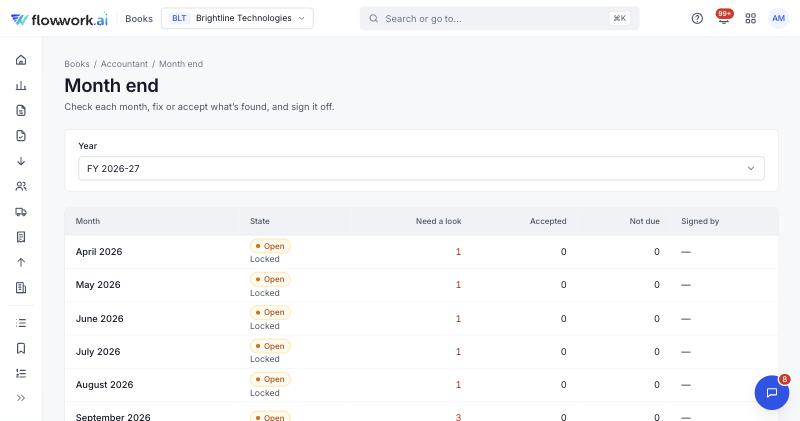
Go to Accountant › Month end. Pick the Year at the top. Each month has a row:
| Column | What it shows |
|---|---|
| State | Open or Signed. Locked under it means the books are locked through that month. |
| Need a look | Checks that failed and aren't accepted yet. |
| Accepted | Failed checks someone accepted with a note. |
| Not due | Checks that can't be judged yet, for example a tax deposit whose due date hasn't come. |
| Signed by | Who signed and when. |
A month shows once the books have started. Months before your books' start date aren't listed. Select a month to open it.
Read the full guide with your flowwork account
The rest of this page has the steps, screenshots and tips. Anyone at a company that uses flowwork can read every page, and ask the Help assistant about it.
Every step, in order Real screenshots The agents that help
New companies use flowwork free until 31 December 2026