
BooksSetup
Items
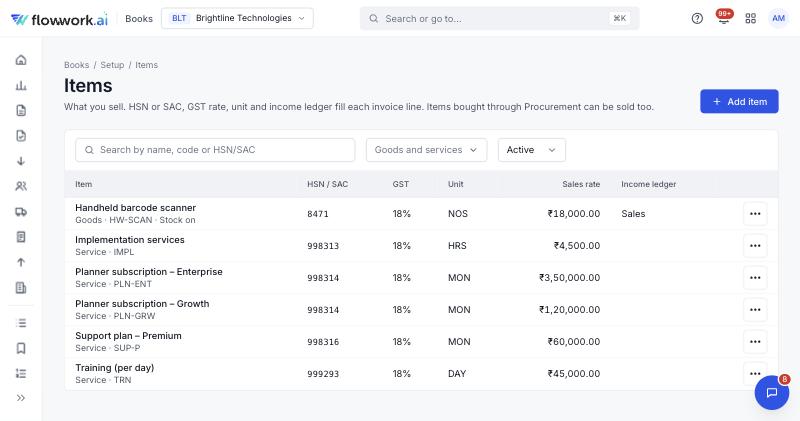
Items are what you sell and buy: goods or services. Each item holds its SKU, HSN or SAC code, GST rate, unit, rates and ledgers, so every quote, invoice, credit note and bill line fills in from it. An item can be sold, bought or both. Add it once and pick it on any document.
Before you start
- Open it from Setup › Items.
- To see items, you need Manage sales or one of View books, Post journals, Manage books settings or Manage banking.
- To add, edit, delete or make items inactive, you need Manage sales or Manage purchases.
- To keep stock of an item, you also need Manage inventory.
- Each legal entity has its own items. Pick the entity at the top first.
Add an item
- Select Add item.
- Choose the Type: Service or Goods.
- Type the Name, and a SKU if you use them. No two items can share a SKU.
- Type the SAC (services: 6 digits starting with 99) or HSN (goods: 4, 6 or 8 digits; 6 or more above ₹5 crore turnover). The search button finds a code in the official HSN and SAC lists by number or words; check the GST rate yourself, it isn't filled in from the code.
- Choose the GST rate. Exempt, nil-rated and non-GST are options too.
- Under Used for, tick Sales, Purchases or both.
- Choose the Unit. For goods, also choose the UQC: GSTR-1 needs a unit code on goods.
- For sales: type the Sales rate (before GST) and choose the Income ledger the sale posts to.
- For purchases: optionally type the Purchase rate (before GST) and choose the Purchase ledger bill lines are charged to. Leave it as Choose on each bill to pick it on the bill.
- Add Cess % and a description if you need them.
- If TCS is on for your company, choose the item's TCS code if its lines should start with one.
- Optionally Add picture: a JPG or PNG up to 5 MB. It shows as a thumbnail in the list.
- Select Save item.
Read the full guide with your flowwork account
The rest of this page has the steps, screenshots and tips. Anyone at a company that uses flowwork can read every page, and ask the Help assistant about it.
Every step, in order Real screenshots The agents that help
New companies use flowwork free until 31 December 2026