
Invoices
Invoices lists every tax invoice, bill of supply, export invoice and plain invoice (from a company not registered for GST) of your company. From here you open an invoice, post a draft, email it, send a payment reminder, record a payment, raise a credit note or void it. Each posted invoice makes a sales voucher in the books.
Before you start
- Open it from Books › Invoices.
- To see invoices, you need Manage sales, or one of View books, Post journals, Manage books settings or Manage banking. People who only read see no action buttons.
- To create, post, send, remind, record payments, edit or void, you need Manage sales.
- Each legal entity has its own invoices. Pick the entity at the top first. See Several companies.
The list
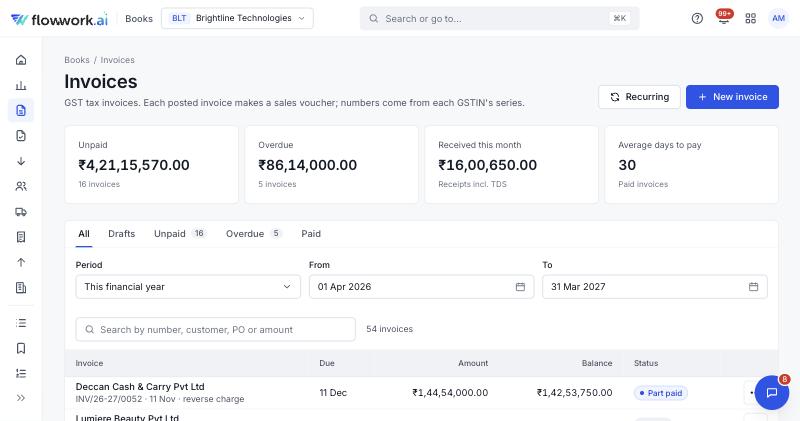
The four figures at the top are Unpaid, Overdue, Received this month (receipts including TDS) and Average days to pay (on paid invoices).
Tabs:
| Tab | What it shows |
|---|---|
| All | Every invoice in the period you choose. |
| Drafts | Invoices not posted yet. They have no number. |
| Unpaid | Posted invoices with something still to pay, whatever their date. |
| Overdue | Posted invoices past their due date and not fully paid, whatever their date. |
| Paid | Posted invoices that are fully paid. |
You can filter by period and, if your company has more than one GSTIN, by GSTIN. GST shows With GST (invoices that charge GST) or Without GST (plain invoices, bills of supply, exports under LUT and reverse charge invoices). The four figures at the top follow it: with a GST filter, Received this month is what this month's receipts paid on those invoices. Search finds an invoice by number, customer, customer PO or amount. Recurring at the top opens Recurring invoices.
Read the full guide with your flowwork account
The rest of this page has the steps, screenshots and tips. Anyone at a company that uses flowwork can read every page, and ask the Help assistant about it.