
BooksPurchases and payments
Bills
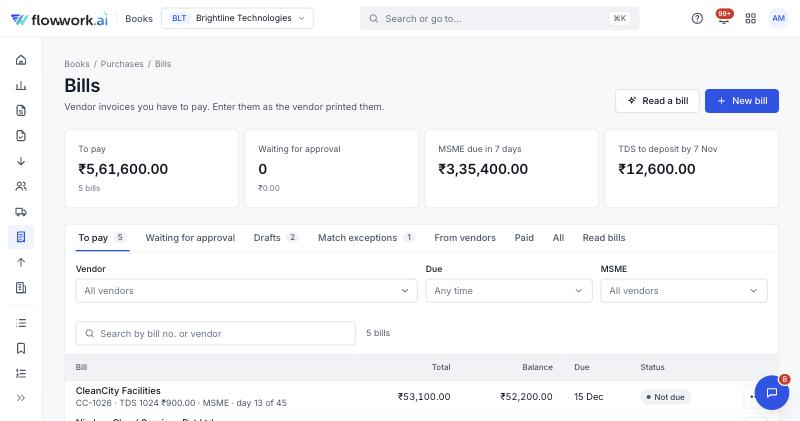
Bills lists the vendor invoices you have to pay. A bill is entered as the vendor printed it, then posted: posting makes the purchase voucher, records the input GST and deducts TDS. If your company has approval rules for bills, a bill waits for approval before it reaches the books.
Before you start
- Open it from Books › Bills.
- To see bills, you need one of Manage purchases, Approve payments, View books, Post journals, Manage books settings or Manage banking.
- To add, post, edit, pay, void or raise a debit note, you need Manage purchases.
- Someone named on a bill's approval step needs no Books permission to open and decide that bill. The link in their notification opens it.
The list
The figures at the top are To pay, Waiting for approval, MSME due in 7 days and TDS to deposit.
| Tab | What it shows |
|---|---|
| To pay | Posted bills with a balance. |
| Waiting for approval | Bills sent for approval. |
| Drafts | Bills not posted yet. |
| Match exceptions | Bills against a purchase order that don't match it (shows only when there are some). |
| From vendors | Invoices vendors sent from the vendor portal (shows only when your company uses it). |
| Paid | Bills fully paid. |
| All | Every bill. |
| Read bills | Photos and PDFs uploaded or sent on WhatsApp to be read into drafts. See Add a bill. |
Filter by Vendor, Due (overdue, in 7 or 30 days), MSME and GSTIN, or search by bill number or vendor.
Read the full guide with your flowwork account
The rest of this page has the steps, screenshots and tips. Anyone at a company that uses flowwork can read every page, and ask the Help assistant about it.
Every step, in order Real screenshots The agents that help
New companies use flowwork free until 31 December 2026