
BooksVouchers and ledgers
Find and filter vouchers
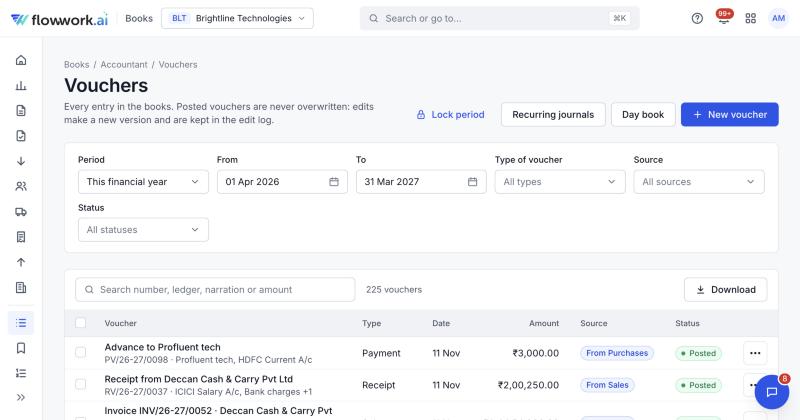
Accountant › Vouchers lists every entry in the books: journals, payments, receipts and contra entries you post here, and the vouchers that invoices, bills, payments, Payroll, Expense and imports make. Use it to find an entry, open it, print it or download the list.
Before you start
- To see this page you need one of these: View books, Post journals, Manage books settings or Manage banking. See Who can do what.
- To post, edit, void or delete vouchers you need Post journals. Without it the page is read-only: you can open, print and download, but New voucher and the edit actions don't show.
- If your company keeps books for more than one legal entity, the list shows the entity picked in the entity switcher. See Legal entities.
Filter the list
The filters sit at the top. Each choice is kept in the page address, so you can bookmark or share a filtered list.
| Filter | What it does |
|---|---|
| Period | Opens on this financial year. Pick a preset or your own dates. |
| Type of voucher | Journal, Payment, Receipt or Contra. |
| Voucher type | Shows when you have your own voucher types. Narrows to one of them. |
| Kind | Shows for journals: Ordinary, Accrual, Prepaid or Provision. |
| Source | Manual, From Payroll, From Expense, From Procurement, From Tally or From Zoho Books. |
| Status | Draft, Posted, Void, Optional or Memo. |
Type in Search to look for a voucher number, a ledger name, words in the narration or an amount.
Read the full guide with your flowwork account
The rest of this page has the steps, screenshots and tips. Anyone at a company that uses flowwork can read every page, and ask the Help assistant about it.
Every step, in order Real screenshots The agents that help
New companies use flowwork free until 31 December 2026