
BooksSetup
Settings
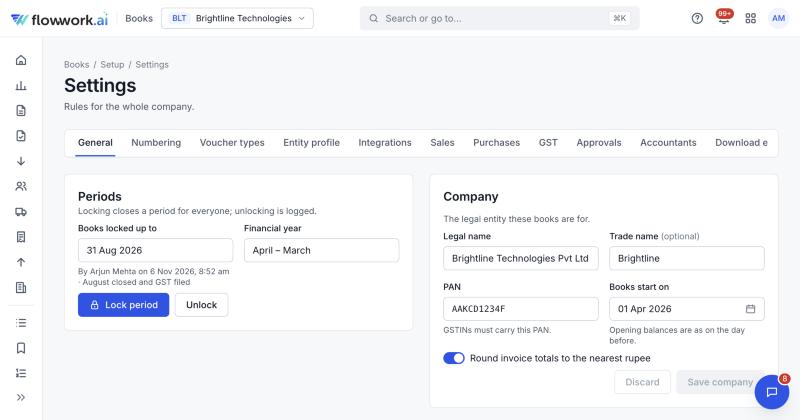
Setup › Settings holds the rules for the whole set of books: the locked period, company details, document numbering, voucher types, sales, purchase and GST settings, approval rules, outside accountants and backups. Everything here is for the legal entity you're in.
Before you start
- Anyone who reads the books can open Settings and see every tab except Approvals, Accountants and Backups.
- Changing most settings needs Manage books settings. Without it, fields are read-only and there's no Save.
- Locking and unlocking periods needs Post journals or Manage books settings.
- GST settings can be changed with Manage books settings or File GST.
- Someone whose only Books permission is Manage books access sees just the Accountants tab.
The tabs
| Tab | What's on it | Who can change it |
|---|---|---|
| General | Periods (lock and unlock), Company, and links to Legal entities, TDS and TCS, Depreciation rates and Exchange rates | See below |
| Numbering | The main number series for each voucher type and year: Document, Format, Next | Read only here |
| Voucher types | Your own voucher types, their prefixes, defaults, limits and who may post them | Manage books settings |
| Entity profile | What kind of body this is, NGO accounting, registrations and approvals | Manage books settings |
| NGO, NGO tax tags, Salary splits | NGO settings. Only when NGO accounting is on. | See The NGO pack |
| Integrations | How journals from Payroll and Expense map to this entity's ledgers | Manage books settings |
| Sales | Invoice and credit note series per GSTIN, quote numbers, UPI on invoices, LUT, payment reminders, invoice defaults, credit control | Manage books settings |
| Purchases | Bank accounts for payments, payment safety checks, TDS, matching with purchase orders, payment advice emails | Manage books settings |
| GST | Turnover and filing rules per GSTIN, and the GST provider | Manage books settings or File GST (provider: Manage books settings) |
| Approvals | Who approves bills and payments, by amount | Manage books settings. Shows to people with settings, purchases or payment approval rights. |
| Accountants | Outside accountants and auditors | Manage books access |
| Backups | All years of the books in one zip, by hand or on a schedule, optionally locked with a password | Manage books settings or Export the books company |
Read the full guide with your flowwork account
The rest of this page has the steps, screenshots and tips. Anyone at a company that uses flowwork can read every page, and ask the Help assistant about it.
Every step, in order Real screenshots The agents that help
New companies use flowwork free until 31 December 2026