
BooksReports and dashboards
Reports, and how downloads work
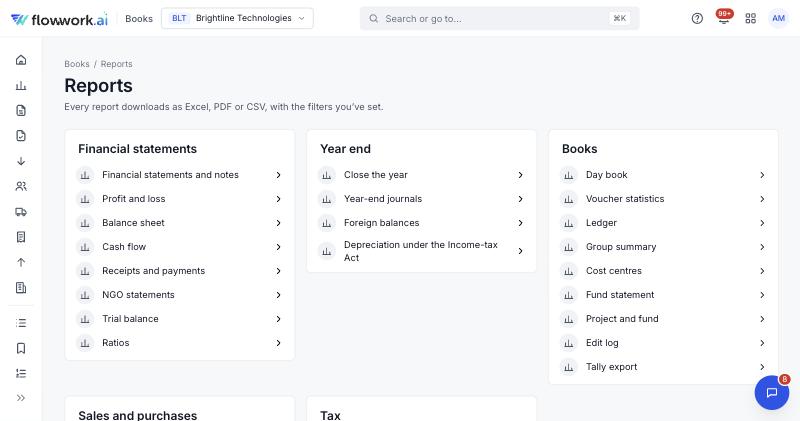
Reports is one page that lists every report in Books, in five groups. Open a report, set the dates and filters, and download it as Excel, PDF or CSV with the same filters. This page explains the list and the things every report has in common.
Before you start
- Go to Accountant › Reports.
- What you can open depends on your permissions. A report you can't open still shows in the list, greyed out, with No access.
- The financial statements, trial balance, ratios, cost centres and dashboard need View financial reports (
allow_view_financial_reports). - The day book, ledgers, group summary, voucher statistics and edit log need read access to the books: View books, Post journals, Manage Books settings or Manage banking.
- Sales reports (receivables ageing, customer statement, sales register, HSN/SAC summary, overdue interest) open with View financial reports or Manage sales. Purchase reports (payables ageing, vendor statement, purchase register) open with View financial reports or Manage purchases.
- The server checks the permissions again when you open or download a report. See Who can do what.
The groups
| Group | Reports |
|---|---|
| Financial statements | Financial statements and notes, Profit and loss, Balance sheet, Cash flow, Receipts and payments, NGO statements, Trial balance, Ratios |
| Year end | Close the year, Year-end journals, Foreign balances, Depreciation under the Income-tax Act |
| Books | Day book, Voucher statistics, Ledger, Group summary, Cost centres, Fund statement, Project and fund, Edit log, Tally export |
| Sales and purchases | Receivables ageing, Interest on overdue receivables, Reminders sent, Collected after a reminder, Customer statement, Sales register, Payables ageing, Vendor statement, Purchase register |
| Tax | HSN/SAC summary, ITC register, TDS register, Form 140 data |
Receipts and payments, NGO statements, Fund statement and Project and fund matter mostly to books with NGO accounting turned on. See NGO statements.
Read the full guide with your flowwork account
The rest of this page has the steps, screenshots and tips. Anyone at a company that uses flowwork can read every page, and ask the Help assistant about it.
Every step, in order Real screenshots The agents that help
New companies use flowwork free until 31 December 2026