
BooksSetup
Opening balances
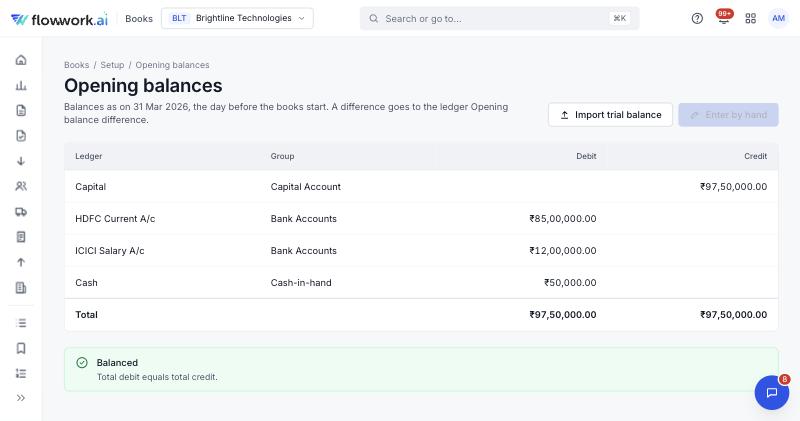
Opening balances are what each ledger held on the day before your books start in Books. You import them from a trial balance or type them ledger by ledger. A new company can start from zero and skip this.
Before you start
- Open it from Setup › Opening balances.
- Anyone who can read the books can see the balances.
- To import or type them, you need Post journals. Manage books settings alone lets you read them, not change them.
- The balances are as on the day before the books start. The page says the date, for example "Balances as on 31 Mar 2026".
- If the books are locked up to that date or later, you can't change them. Unlock first in Settings; unlocking is logged.
- With several legal entities, each entity has its own opening balances. Pick the entity at the top first.
Import a trial balance
- Select Import trial balance.
- Drop a CSV or Excel file on the box, or choose one. It needs the columns Ledger, Group, Debit and Credit, up to 5 MB. A trial balance exported from Tally in this shape works too. Select Download a template for an example.
- Books reads the file and lists each line. For each one, check Maps to:
- Existing ledger: choose which ledger it is.
- New ledger: choose the group the new ledger goes in.
- Skip: leave the line out.
- Check Total debit, Total credit and Difference.
- Select Apply balances. Ledgers marked New ledger are created in their group.
Nothing is saved until you select Apply balances. Applying replaces all opening balances with the file's: ledgers not in the file go back to zero.
Read the full guide with your flowwork account
The rest of this page has the steps, screenshots and tips. Anyone at a company that uses flowwork can read every page, and ask the Help assistant about it.
Every step, in order Real screenshots The agents that help
New companies use flowwork free until 31 December 2026