
ExpenseAgents in Expense
Agents in Expense
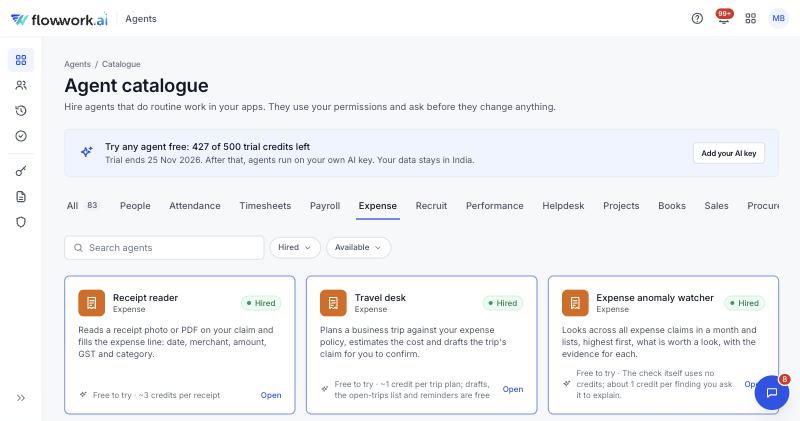
Four agents in the Expense tab of the agent catalogue help with expense claims. The Receipt reader fills an expense line from a receipt. The Expense policy checker briefs an approver on one claim. The Expense anomaly watcher looks across a month of claims for Finance. The Travel desk plans a business trip against your expense policy. Each agent works with your own login, so it sees only the claims you can see in Expense. None of them submits, approves, rejects or pays a claim.
Before you start
- Agents are a paid add-on. AI agents must be switched on for your company. If you don't see Agents in flowwork's menu, ask your admin.
- An agent must be hired before anyone can use it. You need the Manage agents permission to hire one. Go to Agents › Catalogue, select the Expense tab, open the agent and select Hire agent.
- When your admin hires an agent, they choose Who can use it: everyone in the company, or Only people with some roles. They also set a Monthly credit limit. The agent stops for the month when it reaches the limit.
- You also need access to Expense. The Receipt reader and the Travel desk work on your own claims. The Expense policy checker needs claims waiting for your approval, or the permission to view all claims. The Expense anomaly watcher is for Finance: it needs the permission to view all expense claims.
Expense agents
| Agent | What it does | Changes only after your Confirm | Cost (estimate) |
|---|---|---|---|
| Receipt reader | Reads a receipt photo or PDF on your draft claim and fills the expense line: date, merchant, amount, invoice number, GSTIN and category. | Adding the expense line to your draft claim | About 3 credits per receipt |
| Expense policy checker | Before you approve a claim, lists line by line what is over the limit, has no receipt, was filed late or may be a duplicate, and what your written expense policy says. | Nothing: it only reads | About 2 credits per claim |
| Expense anomaly watcher | For Finance. Looks across every claim submitted in a period for the same receipt claimed twice, expenses split under a limit, expenses on leave days or holidays, and other patterns worth a look. | Each question emailed to an employee | The check is free; about 1 credit per finding you ask it to explain |
| Travel desk | Plans a business trip against your expense policy, estimates the cost line by line and drafts the trip's expense claim. Finance sees trips whose claim isn't filed yet. | Creating the trip's draft claim; each reminder email Finance sends | About 1 credit per trip plan; drafts, the open-trips list and reminders are free |
Read the full guide with your flowwork account
The rest of this page has the steps, screenshots and tips. Anyone at a company that uses flowwork can read every page, and ask the Help assistant about it.
Every step, in order Real screenshots The agents that help
New companies use flowwork free until 31 December 2026