
ExpenseYour claims
My claims (your list of claims)
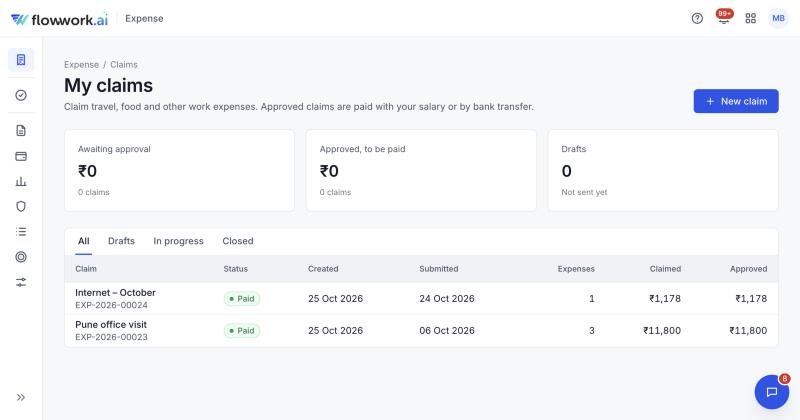
My expenses › Claims lists every expense claim you've made, newest first. From here you start a new claim, see what's waiting for approval or payment, and open any claim to follow it.
Before you start
- You need access to Expense. You don't need any other permission to make and track your own claims.
- You only ever see your own claims here. Claims you approve are under Team › Approvals.
The figures at the top
Three cards sum up where your money is:
| Card | What it shows |
|---|---|
| Awaiting approval | The total you claimed on claims that are In approval, and how many there are. |
| Approved, to be paid | The approved total of claims that are Approved or Payout scheduled, and how many. |
| Drafts | How many claims you haven't sent yet: Draft and Changes requested. |
The cards don't change when you switch tabs.
Read the full guide with your flowwork account
The rest of this page has the steps, screenshots and tips. Anyone at a company that uses flowwork can read every page, and ask the Help assistant about it.
Every step, in order Real screenshots The agents that help
New companies use flowwork free until 31 December 2026