
ExpenseFinance
All claims
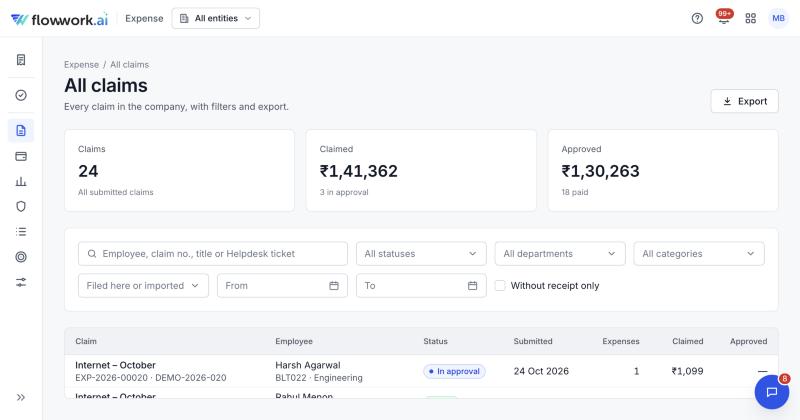
Admin › All claims lists every submitted expense claim in your company, whoever approves it. Use it to find a claim, see totals for a filter, and download claims or their expenses as a CSV file.
Before you start
- You need the permission to view all expense claims. Without it the menu item is hidden.
- Drafts never show here. They belong to the employee until submitted.
- If your company has two or more legal entities, you may be limited to some of them. You then only see claims of those entities.
The figures at the top
The three cards add up every claim that matches your filters, not just the page you're on:
- Claims: how many claims match ("All submitted claims" without filters).
- Claimed: what employees asked for, and how many are In approval.
- Approved: what was approved, and how many are Paid.
Read the full guide with your flowwork account
The rest of this page has the steps, screenshots and tips. Anyone at a company that uses flowwork can read every page, and ask the Help assistant about it.
Every step, in order Real screenshots The agents that help
New companies use flowwork free until 31 December 2026