
ExpenseAgents in Expense
Expense anomaly watcher
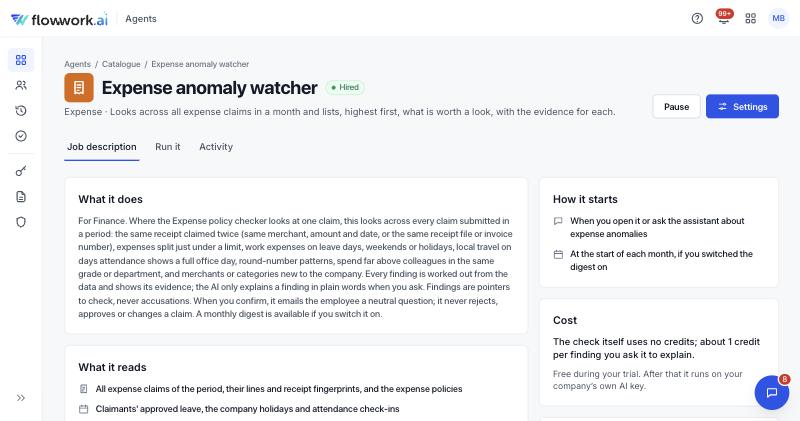
For Finance. Where the Expense policy checker looks at one claim, the anomaly watcher looks across every claim submitted in a period. It lists, highest first, what is worth a look, with the evidence for each. Findings are pointers to check, never accusations. It can draft a neutral question to the employee, which goes only when you confirm. It never rejects, approves, holds or changes a claim.
Before you start
- The agent must be hired for your company, and you must be allowed to use it. See Agents in Expense.
- You need the permission to view all expense claims. Without it you see "You need permission to view all expense claims (Finance)".
- The leave, weekend and office-day checks also read People leave, holidays and Attendance check-ins. If you can't read those, the checks that need them are skipped and the result says so.
What it looks for
| Finding | What it means |
|---|---|
| Same receipt | The same receipt file, the same invoice number at the same merchant, or the same merchant, amount and date on different claims or an earlier month |
| Split under a limit | One person, one day, one category: several lines each just under the policy's per-line limit that together go over it |
| Leave, weekend or holiday | A work expense dated on a full day of approved leave, or on a weekend or company holiday with no check-in that day |
| Travel on an office day | Local travel or mileage on a day attendance shows at least 6 hours checked in |
| Round amounts | Several lines of ₹500 or more in exact hundreds, making up most of a person's lines |
| Above colleagues | A person's total for the period at least three times the middle figure of colleagues in the same grade (or department), and at least ₹5,000 above it |
| New merchant / New category | A merchant or category not seen in the 12 months before |
Every finding is worked out from the data by fixed rules, not by the AI model.
Read the full guide with your flowwork account
The rest of this page has the steps, screenshots and tips. Anyone at a company that uses flowwork can read every page, and ask the Help assistant about it.
Every step, in order Real screenshots The agents that help
New companies use flowwork free until 31 December 2026