
ExpenseSetup
Expense settings
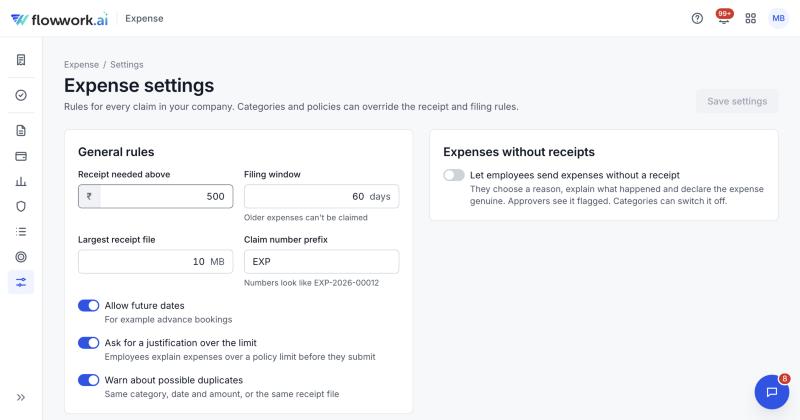
Settings are the company-wide rules for every claim: receipts, how old an expense can be, expenses without receipts, how claims are paid, how approvals behave, vehicle types and which emails go out. Categories and policies can override the receipt and filing rules.
Before you start
- You need the permission to manage expense settings. See Who can do what.
- Find the page under Admin › Settings.
- Until someone saves this page, the company uses the defaults listed below.
- Change what you need, then select Save settings at the top or bottom. The button is greyed out until you change something.
General rules
| Field | What it does | Default |
|---|---|---|
| Receipt needed above | Expenses of more than this amount need a receipt. 0 means every expense needs one. A category can set its own amount. | ₹500 |
| Filing window | Expenses older than this many days can't be claimed. 1 to 3650 days. A category can set its own. | 60 days |
| Largest receipt file | The biggest receipt file employees can upload, 1 to 10 MB. | 10 MB |
| Claim number prefix | The start of every claim number, such as EXP in EXP-2026-00012. Use 1 to 8 letters or digits. | EXP |
| Allow future dates | Lets employees claim expenses dated after today, such as advance bookings. | Off |
| Ask for a justification over the limit | Employees must explain an expense over a policy limit before they submit. Applies to categories set to allow expenses over the limit. | On |
| Warn about possible duplicates | Flags an expense that looks like another one already claimed, or uses the same receipt file. Approvers see the flag; it doesn't stop the submit. | On |
A changed prefix applies to claims numbered from then on. Existing claims keep their numbers.
Read the full guide with your flowwork account
The rest of this page has the steps, screenshots and tips. Anyone at a company that uses flowwork can read every page, and ask the Help assistant about it.
Every step, in order Real screenshots The agents that help
New companies use flowwork free until 31 December 2026