
Set up expense categories
Categories are the kinds of expense people can claim, such as Travel or Food & meals. Each category says how the amount is worked out, when a receipt is needed, how old an expense can be, which extra details to ask for, and what happens when an expense goes over a policy limit. The limits themselves are set in each policy.
Before you start
- You need the permission to manage expense settings. See Who can do what.
- Find the page under Admin › Categories.
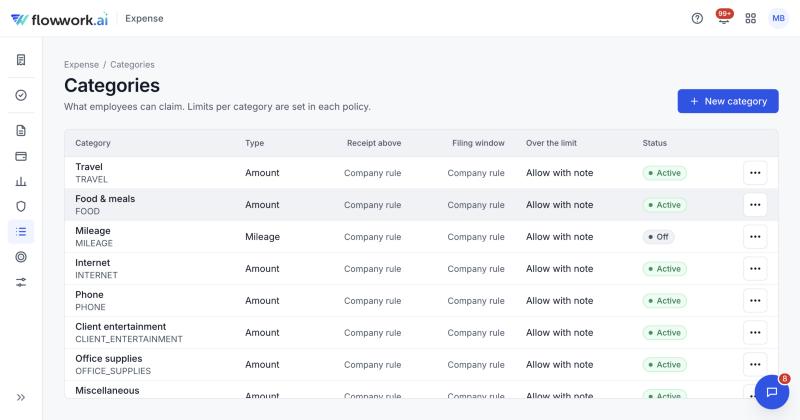
The categories you start with
The first time anyone opens Expense, the company gets these categories. You can change or remove any of them.
| Category | How the amount is worked out | Extra details asked |
|---|---|---|
| Travel | Amount | From / to (required), Travel mode (required), Invoice number |
| Food & meals | Amount | Merchant |
| Mileage | Mileage | From / to (required) |
| Internet | Amount | |
| Phone | Amount | |
| Client entertainment | Amount | Attendees (required), Project or client |
| Office supplies | Amount | |
| Miscellaneous | Amount |
Mileage starts turned off. Set your mileage rates first, then turn it on.
All of them use the company's receipt and filing rules from Settings, and allow expenses over a limit with a justification.
Read the full guide with your flowwork account
The rest of this page has the steps, screenshots and tips. Anyone at a company that uses flowwork can read every page, and ask the Help assistant about it.