
Agents in Procurement
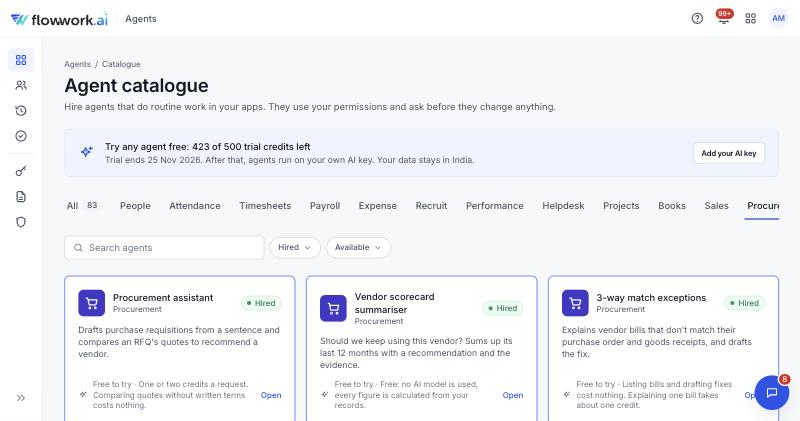
Three agents in the Procurement tab of the agent catalogue help with buying. The Procurement assistant drafts a purchase requisition from a sentence and compares an RFQ's quotes. The 3-way match exceptions agent explains vendor bills in Books that don't match their purchase order and goods receipts, and drafts the fix. The Vendor scorecard summariser sums up a vendor's last 12 months before a renewal, an award or a big order. Each agent works with your own login, so it sees only what you can see in Procurement and Books. None of them approves a requisition, raises a purchase order or pays a bill.
Before you start
- Agents are a paid add-on. AI agents must be switched on for your company. If you don't see Agents in flowwork's menu, ask your admin.
- An agent must be hired before anyone can use it. You need the Manage agents permission to hire one. Go to Agents › Catalogue, select the Procurement tab, open the agent and select Hire agent.
- When your admin hires an agent, they choose Who can use it: everyone in the company, or Only people with some roles. They also set a Monthly credit limit. The agent stops for the month when it reaches the limit.
- You also need access in Procurement or Books. Drafting a requisition needs the permission to raise requisitions or to manage purchasing. Comparing quotes needs the permission to manage purchasing. The vendor scorecard needs the permission to manage purchasing, approve purchases or manage procurement settings. The 3-way match agent reads vendor bills in Books, so you need access to purchases in Books.
Procurement agents
| Agent | What it does | Changes only after your Confirm | Cost (estimate) |
|---|---|---|---|
| Procurement assistant | Drafts a requisition from what you need ("5 laptops for the new joiners by the 20th"), with the catalogue item, an estimate and the budget left. Compares an RFQ's quotes and recommends one with its reasons. | Creating the requisition; awarding the RFQ | One or two credits a request; comparing quotes with no written terms is free |
| 3-way match exceptions | Lists vendor bills that don't match their purchase order and goods receipts, says what is off in plain words and proposes a fix. | Accepting a small difference in Books; each email to the vendor | Listing and drafting are free; about 1 credit to explain one bill |
| Vendor scorecard summariser | Sums up a vendor's last 12 months (spend, on-time delivery, quality, prices, bills, GSTIN, contracts) and recommends keep, keep with conditions, review or don't award. Lists the vendors that need a look. | Nothing: it only reads | Free |
Read the full guide with your flowwork account
The rest of this page has the steps, screenshots and tips. Anyone at a company that uses flowwork can read every page, and ask the Help assistant about it.