
ProcurementRequisitions
Raise a requisition
A requisition is how you ask for something to be bought, for example five laptops for new joiners or a year of cleaning services. You say what you need, how many and by when. Your company's approval rules decide who approves it, and once it's approved, purchasing asks vendors for quotes or orders it.
Before you start
- You need permission to raise requisitions (the Procurement Requester role has it), or permission to manage purchasing.
- Your account should be linked to your employee record in People. Your department, cost centre and reporting manager come from there.
- You can raise requisitions only for your own departments in People: your main department or an additional one. People with Manage purchasing can raise them for any department.
Steps
- Go to Procurement › My requisitions (buyers see Requisitions).
- Select New requisition. You can also start one from the Dashboard.
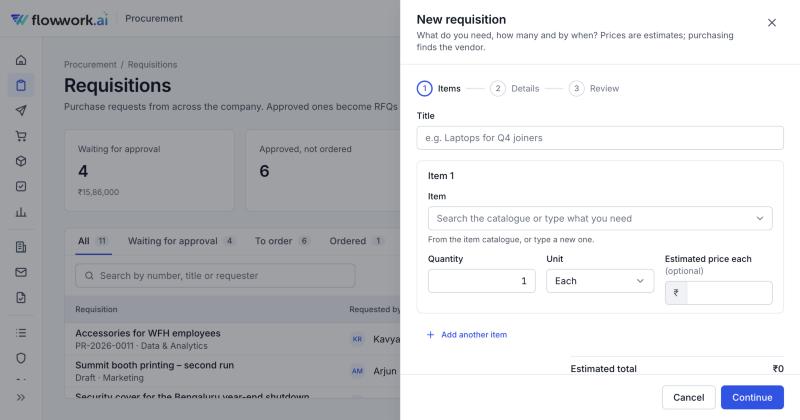
- In Title, name the request, for example "Laptops for Q4 joiners". Up to 120 characters.
- Under Item 1, pick an Item from the catalogue, or type what you need and choose Use "…" if it isn't in the catalogue.
- Fill in Quantity, Unit and, if you know it, Estimated price each.
- Select Add another item for each extra item.
- Select Continue.
- Choose Needed by. The other fields on this step are optional: Department, Cost centre, Deliver to, Preferred vendor, Why is this needed? and files. Department starts with your own department from People.
- Select Continue to see the Review step.
- Select Submit to send it for approval, or Save draft to finish it later.
Read the full guide with your flowwork account
The rest of this page has the steps, screenshots and tips. Anyone at a company that uses flowwork can read every page, and ask the Help assistant about it.
Every step, in order Real screenshots The agents that help
New companies use flowwork free until 31 December 2026