
ProcurementSetup
Items, categories, units and rate contracts
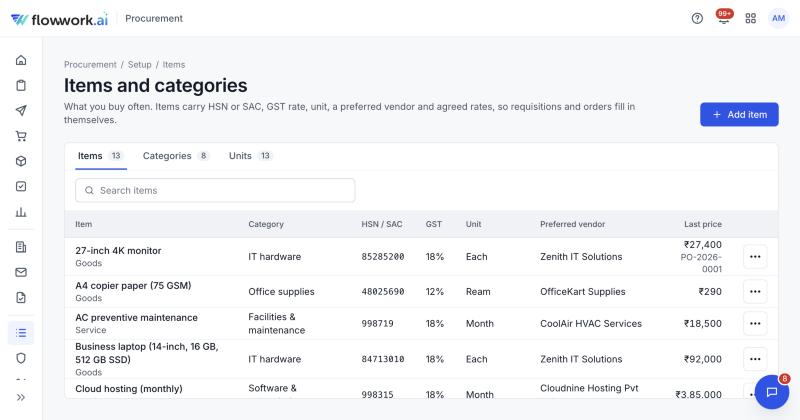
The item catalogue holds the things your company buys often. Each item carries its unit, HSN or SAC code, GST rate, a preferred vendor and its last price, so requisitions and RFQs fill in by themselves. Rate contracts on an item record prices you agreed with vendors for a period. Categories group items for approval rules, budgets and reports.
Before you start
- Items is under Setup in the menu. You see it with Manage purchasing or Manage procurement settings.
- To add and edit items and their rate contracts you need Manage purchasing (buyers).
- To add, rename and turn off Categories and Units you need Manage procurement settings.
- To pick a preferred vendor or a vendor for a rate contract you also need to be able to see vendors. Only Active vendors can be picked.
- People who raise requisitions don't need this page: they pick items from the catalogue in the requisition, and can always type anything else as free text.
Add an item
- Open Setup › Items and stay on the Items tab.
- Select Add item.
- Enter the Name, for example "Laptop · 14", 16 GB, 512 GB SSD".
- Pick the Kind: Goods (with an HSN code) or Service (with a SAC code).
- Pick the Category (optional) and the Unit.
- Enter the HSN or SAC (optional) and pick the GST rate: 0 %, 5 %, 12 %, 18 % or 28 %.
- Pick the Preferred vendor if you have one.
- Enter the Last price before GST, if you know it, and a Description.
- If your company uses Inventory and this is something you keep in stock, pick its Catalogue item (see below).
- Select Save item.
To change an item, select the ⋯ menu on its row and Edit. To stop offering it, turn Active off: inactive items aren't offered on new requisitions, and requisitions and orders that already use them keep them.
Read the full guide with your flowwork account
The rest of this page has the steps, screenshots and tips. Anyone at a company that uses flowwork can read every page, and ask the Help assistant about it.
Every step, in order Real screenshots The agents that help
New companies use flowwork free until 31 December 2026