
ProcurementVendors
Vendor scorecard
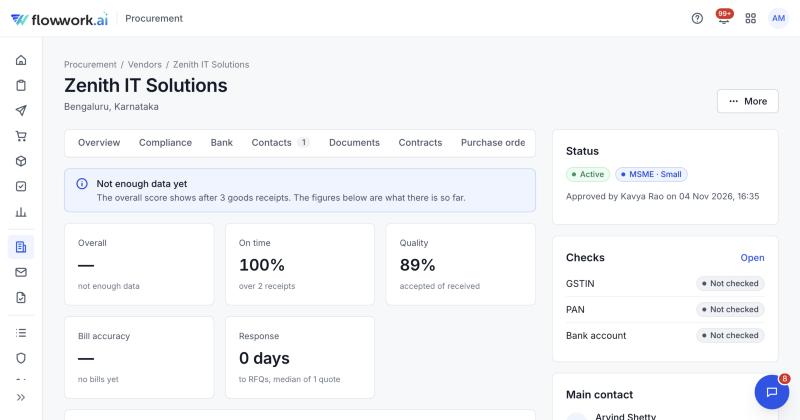
The Scorecard tab on a vendor shows how they do: delivering on time, the quality of what arrives, how accurate their bills are and how fast they answer RFQs. It's worked out from your own records, so nobody has to rate vendors by hand. The overall score, out of 5, also shows in the Score column on Vendors.
Before you start
- The Scorecard tab and the Score column show to people who manage purchasing (the Procurement Buyer and Procurement Administrator roles).
- The figures come from goods receipts, bills matched in Books and RFQ quotes. A new vendor has no score yet.
What's on the tab
- Overall: the score out of 5, with one decimal. It shows after the vendor has 3 goods receipts. Until then you see Not enough data yet and the figures so far.
- On time: the share of goods receipts that arrived on time.
- Quality: accepted quantity as a share of received quantity.
- Bill accuracy: the share of the vendor's bills on your purchase orders that matched without a match exception.
- Response: how many days, typically (the median), the vendor took from being invited to an RFQ to sending a quote.
- Overall score by quarter: the last four quarters of your financial year (April to March), each from that quarter's receipts and bills.
- Comments from receivers: the latest 20 notes left when a goods receipt was recorded, with Good or Problem.
Read the full guide with your flowwork account
The rest of this page has the steps, screenshots and tips. Anyone at a company that uses flowwork can read every page, and ask the Help assistant about it.
Every step, in order Real screenshots The agents that help
New companies use flowwork free until 31 December 2026