
ProcurementQuotes (RFQs)
Compare quotes and award an RFQ
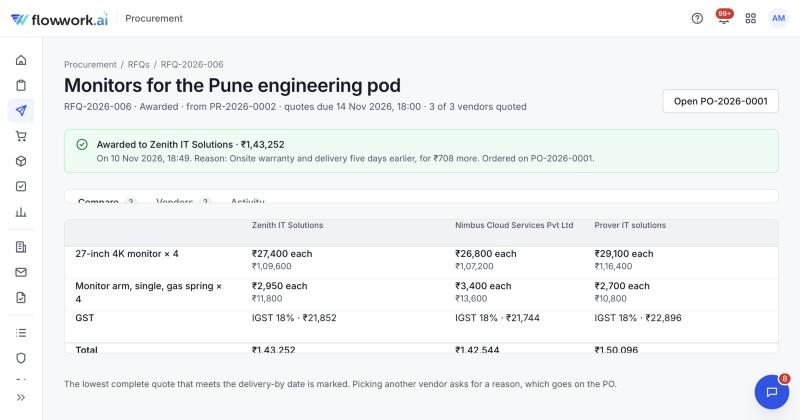
Once quotes are in, the RFQ's Compare tab puts them side by side: price per item, GST, total, delivery date and terms. The lowest complete quote that delivers on time is marked. You award one vendor, and a draft purchase order for that vendor is created for you.
Before you start
- You need permission to manage purchasing.
- The RFQ must be Quotes in: at least one vendor has quoted.
Read the comparison
Each vendor who quoted has a column. Quotes from the portal are marked from portal.
- Item rows: the price each, the line amount, a different quantity if they quoted one, and a different model or brand. Not quoted means they didn't price that item.
- GST: IGST or CGST + SGST, the rate and the GST amount.
- Total: including GST. "Laptop bag missing" or "2 items missing" when items weren't priced.
- Delivery: their delivery date, with "after the delivery-by date" when it's later than you asked.
- Warranty and terms: what they wrote.
- Scorecard: shows "Coming soon" for now. To see how a vendor has performed, open their Scorecard tab in Vendors.
- The last row flags each quote: Lowest (the recommended one), Incomplete (items missing) or Exception (late delivery).
Read the full guide with your flowwork account
The rest of this page has the steps, screenshots and tips. Anyone at a company that uses flowwork can read every page, and ask the Help assistant about it.
Every step, in order Real screenshots The agents that help
New companies use flowwork free until 31 December 2026